What’s the ideal mouse DPI and polling rate for competitive esports titles?

Decoding Mouse DPI for Competitive Play
In the high-stakes world of competitive esports, every millisecond and every pixel matters. Your mouse’s settings, specifically its DPI (Dots Per Inch) and polling rate, play a crucial role in determining your aiming precision and overall responsiveness. Understanding these concepts and how they interact is fundamental to optimizing your setup.
DPI refers to how sensitive your mouse sensor is. A higher DPI means the cursor moves further across the screen for a given physical movement of the mouse. While a high DPI might sound appealing for quick turns, professional players often opt for surprisingly low DPI settings, typically ranging from 400 to 1600. The logic behind this is simple: lower DPI, when combined with appropriate in-game sensitivity, allows for finer, more precise movements. It reduces the chance of ‘pixel skipping’ and helps build consistent muscle memory for aiming, which is paramount in fast-paced shooters like CS:GO, Valorant, or Overwatch.
Understanding Polling Rate and Its Impact
The polling rate, measured in Hertz (Hz), dictates how often your mouse reports its position to your computer. A 125Hz polling rate means your mouse reports its position 125 times per second, or every 8 milliseconds. A 1000Hz polling rate means it reports 1000 times per second, or every 1 millisecond. For competitive gaming, a higher polling rate is almost universally preferred.
A higher polling rate translates to smoother cursor movement, less input lag, and more accurate tracking of your mouse’s physical movements. This increased responsiveness is critical in situations where split-second reactions are required, providing a more fluid and direct connection between your hand and the on-screen action. While older systems or some games might struggle with very high polling rates, modern gaming setups are typically well-equipped to handle 1000Hz without issues, making it the de facto standard for serious esports competitors.
The eDPI Equation: Finding Your Sensitivity Sweet Spot
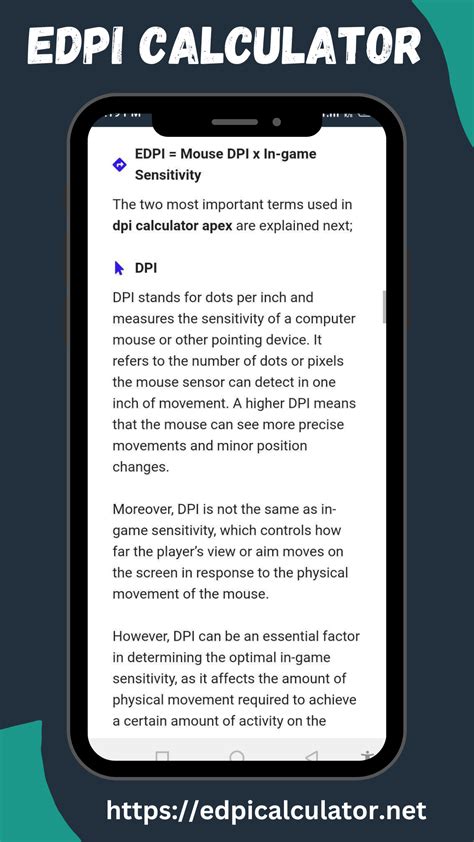
While DPI is a hardware setting, it’s only half of the sensitivity equation. In-game sensitivity scales your mouse’s input. The true measure of your overall sensitivity is your Effective DPI, or eDPI, which is calculated by multiplying your mouse’s DPI by your in-game sensitivity setting (DPI x In-game Sensitivity = eDPI). For example, a player using 800 DPI with an in-game sensitivity of 0.5 has an eDPI of 400.
Professional players across various titles often fall within specific eDPI ranges. For tactical shooters, common eDPI values are often quite low, sometimes between 200 and 800, emphasizing arm aim over wrist aim for greater consistency. For faster-paced arena shooters or MOBAs, eDPI might be slightly higher to facilitate quicker target acquisition and camera movement. The key is to find an eDPI that allows for precise micro-adjustments while also enabling comfortable 180-degree turns when necessary.
Ideal Settings for Competitive Esports
Based on pro player trends and technical benefits, the ideal mouse settings for competitive esports generally converge on these recommendations:
- DPI: 400 – 800 (some go up to 1600, but rarely higher). This low-to-mid range allows for superior accuracy and control.
- Polling Rate: 1000Hz. This ensures the lowest possible input lag and the smoothest, most accurate tracking.
This combination prioritizes raw input and consistency, minimizing any artificial acceleration or smoothing that could hinder muscle memory development. Most professional players utilize these settings, then fine-tune their in-game sensitivity to achieve their preferred eDPI for specific titles and playstyles. It’s crucial to disable any mouse acceleration features in your operating system or mouse software, as these can introduce inconsistency.
Conclusion: Consistency and Personal Preference are Key
While the technical ideal points towards low DPI and high polling rates, the ultimate ‘best’ setting is highly personal. It’s about finding what feels most comfortable and consistent for *you* over long periods of intense gameplay. Experiment with these recommended baseline settings and then make small adjustments to your in-game sensitivity until you find your perfect balance. Consistency is king in esports; once you find settings that work, stick with them to build strong muscle memory that will translate into peak performance.