





What’s the optimal gaming mouse DPI and sensitivity setup for FPS games?

Unveiling the Secret to Optimal FPS Aim
In the fast-paced world of first-person shooter (FPS) games, every millisecond and pixel of movement counts. A player’s ability to aim precisely and react swiftly is paramount, and at the heart of this ability lies their mouse DPI and sensitivity setup. Far from being a one-size-fits-all solution, the “optimal” setup is a delicate balance of personal preference, hardware limitations, and strategic understanding. This guide will demystify DPI, sensitivity, and eDPI, helping you find the perfect configuration to elevate your gameplay.
DPI, Sensitivity, and eDPI: The Core Concepts
Before diving into optimal numbers, it’s crucial to understand the fundamental terms:
- DPI (Dots Per Inch): This is a hardware setting of your mouse, indicating how many pixels the cursor moves on screen for every inch the mouse moves on your pad. A higher DPI means your cursor moves further with less physical mouse movement.
- In-Game Sensitivity: This is a software setting within the game itself, acting as a multiplier for your mouse’s DPI. A higher in-game sensitivity makes your cursor move even further based on your DPI.
- eDPI (Effective Dots Per Inch): This is the most critical metric for comparing setups across different games and mice. It’s calculated by multiplying your mouse’s DPI by your in-game sensitivity (DPI x In-Game Sensitivity = eDPI). This value represents the true sensitivity you experience in-game.
The Quest for the Perfect eDPI: Low vs. High
For most competitive FPS players, especially those involved in esports, a lower eDPI is generally preferred. This might seem counterintuitive to newcomers who often crank up their sensitivity, thinking it makes them faster. However, a lower eDPI offers:
- Enhanced Precision: Smaller physical movements on the mouse pad translate to finer adjustments on screen, allowing for more accurate micro-aim.
- Greater Consistency: With more physical movement required to cover the same distance, muscle memory for aiming becomes more ingrained and less prone to overshooting.
- Reduced Flick-Shot Dependency: While flick shots are cool, relying on consistent tracking and crosshair placement is more reliable.
Professional players typically fall into an eDPI range of 400 to 1600. Some outliers exist, but this range covers the vast majority, emphasizing precision over twitch speed.

Finding Your Personal Sweet Spot
There’s no single “optimal” eDPI because it’s deeply personal. Here’s a systematic approach to finding yours:
1. Start with a Baseline
Begin with a common competitive eDPI, such as 800-1200. If your mouse has a native DPI of 400 or 800, use that and adjust your in-game sensitivity accordingly to reach your target eDPI. For example, if your mouse is 800 DPI, an in-game sensitivity of 1.0 results in 800 eDPI.
2. Test in Practice
Load up an aim trainer or a private match with bots. Practice 180-degree turns and tracking moving targets. Can you comfortably turn around to address threats behind you without lifting your mouse too often? Can you precisely track a moving headshot target?
3. Adjust Gradually
If you’re overshooting, lower your in-game sensitivity. If you’re undershooting or struggling to turn quickly, increase it. Make small adjustments (e.g., 0.05-0.1 in-game sensitivity increments) and test again. Give each adjustment significant playtime (at least a few hours) to let your muscle memory adapt.
4. Consider Your Arm vs. Wrist Aim
Lower eDPI encourages arm aim, where large movements come from your shoulder and elbow. Higher eDPI leans towards wrist aim, where movements are confined to your wrist. Arm aim generally provides more stability and precision for tracking.
Crucial Settings Beyond DPI and Sensitivity
Disable Mouse Acceleration
This is arguably the most important setting. Mouse acceleration (often called “Enhance pointer precision” in Windows or various names in mouse software) makes your cursor move further the faster you move your mouse. This introduces inconsistency, making it impossible to build reliable muscle memory. Disable it everywhere: Windows, game settings, and mouse driver software.
Maintain a High Polling Rate
A polling rate (or report rate) of 1000Hz (1ms response time) is standard for gaming mice. This means your mouse reports its position to your computer 1000 times per second, ensuring minimal input lag. Most modern gaming mice support this, but double-check your mouse software.
Mousepad Matters
A large, high-quality mousepad is essential for low eDPI setups, allowing ample space for broad arm movements without running out of room. Consider control-oriented pads for more friction and precision, or speed pads for faster glides.
Pro Player Insights and Common Trends
While specific numbers vary, most professional FPS players across titles like CS:GO, Valorant, Apex Legends, and Overwatch tend to use:
- Mouse DPI: Often 400, 800, or occasionally 1600. These are typically the “native” DPI steps of sensors, offering the purest tracking.
- eDPI: Ranging from 200 (extremely low) to 1600 (moderate). The sweet spot for many is between 400-1200 eDPI.
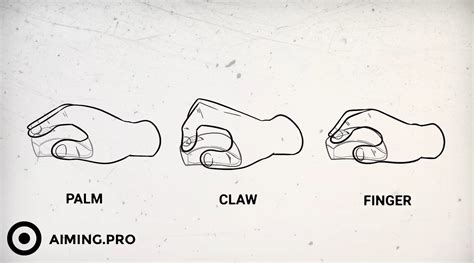
- Mouse Grip: Palm and Claw grips are prevalent due to their balance of stability and control.
The key takeaway is consistency and control, not just raw speed. Many pros spend countless hours in aim trainers refining their aim with their chosen settings.

Conclusion: Your Aim, Your Rules (with Guidelines)
Finding the optimal gaming mouse DPI and sensitivity for FPS games is a journey of experimentation and refinement. While the general consensus leans towards lower eDPI for enhanced precision and consistency, your personal comfort and playstyle are paramount. Start with a recommended baseline, systematically adjust, disable mouse acceleration, and invest in a good mousepad. With dedication to practice and a finely tuned setup, you’ll be well on your way to pixel-perfect aim and dominating the scoreboard.


