





What’s the optimal monitor refresh rate and response time for competitive FPS gaming?

For competitive First-Person Shooter (FPS) gaming, every millisecond and visual cue can mean the difference between victory and defeat. While skill, strategy, and a powerful PC are foundational, your monitor’s specifications—specifically its refresh rate and response time—play a profoundly critical role in how fluidly you experience the game and how quickly you can react to on-screen events.
The Significance of Refresh Rate (Hz)
Refresh rate, measured in Hertz (Hz), indicates how many times per second your monitor can draw a new image. A higher refresh rate means smoother motion, less ghosting, and a more immediate visual feedback loop. For competitive FPS titles like CS:GO, Valorant, Apex Legends, or Call of Duty, a higher refresh rate directly translates to a competitive advantage.
Standard office monitors typically operate at 60Hz. While adequate for general use, this rate introduces noticeable choppiness and input lag in fast-paced games. Moving up to 120Hz, 144Hz, 240Hz, or even 360Hz+ monitors drastically improves the visual fluidity, making enemy movements clearer and easier to track. This enhanced clarity allows players to spot opponents faster, track them more accurately, and land shots with greater precision.
Decoding Response Time (ms)
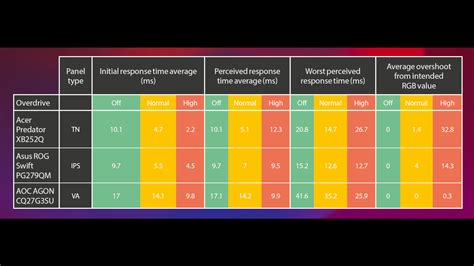
Response time, measured in milliseconds (ms), refers to the time it takes for a pixel to change from one color to another (typically from gray to gray, or GtG). A lower response time minimizes motion blur and ghosting, ensuring that fast-moving objects appear sharp and clear rather than leaving a blurry trail. In competitive FPS, where precise aiming and rapid target acquisition are paramount, reducing motion blur is crucial.
For competitive play, a 1ms GtG response time is widely considered the gold standard. While some monitors advertise 0.5ms or even faster MPRT (Moving Picture Response Time), it’s important to differentiate. GtG measures actual pixel transitions, whereas MPRT often involves backlight strobing techniques that can reduce brightness or introduce flicker, though they effectively reduce perceived motion blur. Always prioritize a low GtG rating for the most authentic and consistently clear visual experience.
The Symbiotic Relationship: FPS, GPU, and Adaptive Sync
Having a monitor with a high refresh rate is only beneficial if your graphics card (GPU) can consistently render frames at or above that rate. A 240Hz monitor paired with a PC that only pushes 100 FPS will still only display 100 unique frames per second. Therefore, ensuring your gaming rig can achieve high frame rates is as important as the monitor itself.
Technologies like NVIDIA G-Sync and AMD FreeSync synchronize your monitor’s refresh rate with your GPU’s frame rate. This eliminates screen tearing and reduces stuttering, providing a much smoother gaming experience, especially when frame rates fluctuate. While some competitive players prefer to disable these for the absolute lowest input lag possible (as they can introduce a tiny amount), for most, the benefits of tear-free gameplay outweigh this marginal difference.
Identifying the Optimal Specifications
So, what’s the sweet spot for competitive FPS gaming?
- Refresh Rate: While 144Hz is an excellent starting point and a significant upgrade over 60Hz, serious competitive players will ideally aim for 240Hz or higher. The jump from 144Hz to 240Hz, while less dramatic than 60Hz to 144Hz, still provides a discernible advantage in tracking and responsiveness. Monitors with 360Hz or even 500Hz are emerging, offering the absolute pinnacle of smoothness, though they come at a premium.
- Response Time: Stick to monitors with 1ms GtG. Anything higher than 3-4ms GtG can introduce noticeable ghosting, hindering your ability to react quickly and accurately.
Considering budget and value, a 144Hz to 165Hz monitor with 1ms GtG response time offers a fantastic balance of performance and affordability. For those dedicated to reaching the top tiers of competitive play, investing in a 240Hz (or higher) 1ms GtG monitor is a worthwhile upgrade.

Beyond the Numbers: Panel Type and Input Lag
While refresh rate and response time are paramount, other monitor characteristics also play a role:
- Panel Type:
- TN (Twisted Nematic): Historically the go-to for competitive gaming due to their incredibly fast response times and high refresh rates. However, they typically have poorer color reproduction and viewing angles.
- IPS (In-Plane Switching): Offers superior color accuracy and wider viewing angles, with modern IPS panels now achieving 1ms GtG and high refresh rates, making them a popular choice for all-around gaming.
- VA (Vertical Alignment): Known for excellent contrast ratios and deep blacks, but often have slower response times, which can lead to more ghosting in fast-paced games.
- Input Lag: This refers to the delay between when an action occurs on your PC and when it’s displayed on the screen. It’s separate from response time. Look for monitors with low input lag, though most modern gaming monitors are optimized in this regard.
Conclusion
For competitive FPS gaming, prioritizing a high refresh rate and a low response time is non-negotiable for gaining a competitive edge. Aim for a monitor with at least 144Hz, ideally 240Hz or higher, coupled with a 1ms GtG response time. This combination, supported by a capable graphics card, will provide the visual clarity, fluidity, and responsiveness needed to perform at your best and truly experience the fast-paced action without compromise. Your monitor is your window into the game; ensure it’s a clear, fast, and responsive one.



