





What’s the optimal monitor refresh rate for competitive FPS games?

In the high-stakes world of competitive First-Person Shooter (FPS) games, every millisecond counts. From aiming precision to quick reaction times, a player’s hardware setup can provide a significant edge. Among the most crucial components for visual performance is the monitor’s refresh rate. But what exactly is the optimal refresh rate to climb the ranks?
Understanding Monitor Refresh Rate
Refresh rate, measured in Hertz (Hz), refers to the number of times your monitor updates the image on the screen per second. A 60Hz monitor refreshes 60 times per second, while a 144Hz monitor refreshes 144 times. The higher the number, the smoother and more fluid the motion appears on screen. For competitive FPS titles, where fast-moving targets and rapid camera movements are common, this fluidity is paramount.
The Benefits of High Refresh Rates for FPS
The advantages of a higher refresh rate in competitive FPS games are multifaceted:
- Smoother Visuals: Faster refresh rates reduce motion blur, making it easier to track enemies as they move across your screen, especially during rapid panning or target acquisition.
- Reduced Input Latency: While not the sole factor, a higher refresh rate generally contributes to lower system input lag, as the monitor can display new frames from your GPU more quickly. This means less delay between your mouse click and the action appearing on screen.
- Better Target Tracking: With more up-to-date visual information, you can react more quickly to enemy movements, improving your flick shots and sustained tracking accuracy.
- Less Screen Tearing: When combined with adaptive sync technologies like G-Sync or FreeSync, higher refresh rates help eliminate screen tearing, which occurs when your GPU renders frames faster or slower than your monitor’s refresh cycle.

Common Refresh Rates and Their Impact
Let’s look at the typical refresh rates available and their suitability for competitive play:
- 60Hz: Once the standard, 60Hz is now considered the bare minimum. While playable for casual gaming, it introduces noticeable motion blur and lag for competitive FPS players. You’ll be at a significant disadvantage against opponents with higher refresh rate monitors.
- 120Hz/144Hz: This is often considered the sweet spot for many competitive FPS players. The jump from 60Hz to 120Hz or 144Hz is immediately noticeable and provides a massive improvement in responsiveness and visual clarity. Most professional players consider 144Hz a baseline for serious competition.
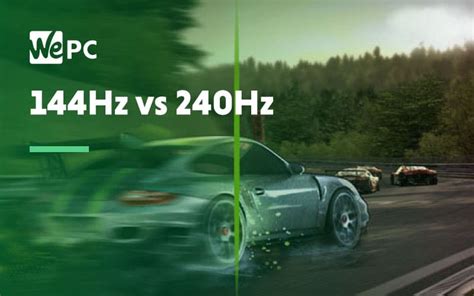
- 240Hz: For elite players and those with high-end GPUs capable of consistently pushing 240+ FPS, 240Hz monitors offer a further, albeit less dramatic, improvement over 144Hz. The visual clarity is exceptional, and the reduction in input lag is marginal but potentially critical at the highest levels of play.
- 360Hz+: The bleeding edge of refresh rates, 360Hz and even 540Hz monitors are designed for the absolute top tier of professional esports. While the visual difference from 240Hz is subtle to most, these monitors provide every conceivable advantage in terms of responsiveness and frame data.
The Optimal Choice: Finding Your Sweet Spot
There isn’t a single “optimal” refresh rate for everyone, as it depends on your budget, your PC’s capabilities, and your personal sensitivity to visual smoothness.
- For the Serious Gamer (Budget-Conscious): 144Hz is your best bet. It offers a tremendous upgrade over 60Hz at a relatively affordable price point, and your GPU doesn’t need to be top-of-the-line to achieve consistent 144 FPS in most competitive titles.
- For the Competitive Enthusiast: If your budget allows and your PC can reliably push 200+ FPS in your preferred games, a 240Hz monitor is a worthwhile investment. It provides an extra layer of fluidity and responsiveness that can make a difference.
- For the Aspiring Pro: If you’re competing at the highest levels and demand every possible advantage, a 360Hz or higher monitor, paired with a bleeding-edge PC, is the way to go.
Beyond Refresh Rate: Other Crucial Factors
While refresh rate is vital, it’s part of a larger ecosystem. Consider these alongside your refresh rate choice:
- Response Time: Look for monitors with a low response time (1ms GTG is ideal) to minimize ghosting and motion blur.
- Input Lag: Separate from response time, some monitors have higher internal processing lag. Look for reviews that specifically measure total input lag.
- Resolution: Higher resolutions (e.g., 1440p) demand more GPU power to achieve high frame rates. For competitive FPS, many pros stick to 1080p to maximize FPS.
- Adaptive Sync (G-Sync/FreeSync): These technologies synchronize your monitor’s refresh rate with your GPU’s frame rate, eliminating tearing and stuttering without the input lag of V-Sync.
- Your PC’s Performance: A high refresh rate monitor is useless if your PC can’t consistently output frames at or above that rate. Ensure your CPU and GPU are powerful enough for your chosen refresh rate.
Conclusion
For competitive FPS games, investing in a monitor with a high refresh rate is one of the most impactful hardware upgrades you can make. While 144Hz provides an excellent balance of performance and cost-effectiveness, pushing to 240Hz or even 360Hz can offer marginal yet crucial advantages for those seeking to compete at the very top. Ultimately, the “optimal” refresh rate is the highest one your budget and PC can consistently support, allowing you to experience the fluid, responsive gameplay necessary to excel.



