





Where can I find trustworthy game mods and supportive communities for safe play?
Navigating the World of Game Mods Safely
Game modifications, or ‘mods,’ can revolutionize your gaming experience, adding new content, improving graphics, or even creating entirely new gameplay mechanics. However, venturing into the modding scene requires caution. The internet is vast, and not all mods or communities are created equal in terms of trustworthiness and safety. This guide will help you identify reliable sources and supportive communities to enhance your games without compromising your system or peace of mind.
Identifying Trustworthy Mod Sources
The first step to safe modding is knowing where to look. Not all modding sites are built alike, and some offer significantly better security and community oversight than others.
Official & Curated Modding Hubs
- Steam Workshop: For games that support it (like Skyrim, Garry’s Mod, Cities: Skylines), the Steam Workshop is often the safest bet. Mods are integrated directly into your game, and the platform benefits from Valve’s security infrastructure. While not immune to issues, it’s generally well-moderated.
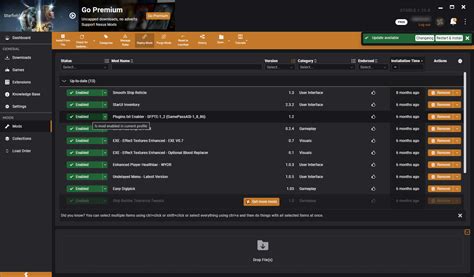
- Nexus Mods: Arguably the largest and most popular third-party modding site, Nexus Mods hosts millions of files for hundreds of games. Its strength lies in its robust community features, including user reviews, download tracking, and a comprehensive file scanner. Mod authors build reputations here, making it easier to identify reliable content.
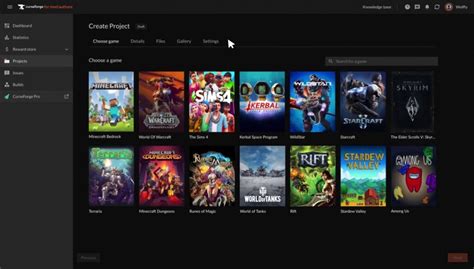
- Official Game-Specific Portals: Some games, like Minecraft (CurseForge, Planet Minecraft) or Fallout/Elder Scrolls (Bethesda.net Mods), have their own dedicated, official or semi-official mod portals. These often have stricter upload guidelines and better integration.
When downloading from any source, always check for active communities, frequent updates, and positive user feedback. A mod with many endorsements and few bug reports is a good sign.
Spotting Reputable Modders and Quality Mods
Beyond the platform, the mod author themselves is a crucial indicator of trustworthiness. A reputable modder will typically have a history of well-received mods, clear communication, and an active presence within the community.
- Author Reputation: Look for modders with a long-standing history, high user ratings, and many downloads. Newer modders aren’t necessarily untrustworthy, but established creators offer more assurance.
- Mod Descriptions & Instructions: High-quality mods come with detailed descriptions, clear installation instructions, compatibility notes, and often a FAQ section. Vague or poorly written descriptions can be a red flag.
- User Comments & Bug Reports: Scrutinize the comments section. Are users reporting significant bugs, conflicts, or even malicious activity? An active comment section where the author responds to issues is a very positive sign.
- File Scans: Many modding sites, including Nexus Mods, scan uploaded files for known malware. Always ensure this process has occurred, and if you’re particularly cautious, run your own antivirus scan on downloaded archives before installing.

Finding Supportive Modding Communities
A good community is invaluable for troubleshooting, discovering new mods, and getting help. These communities also act as a filter, quickly identifying and ostracizing malicious content or users.
- Dedicated Modding Forums: Websites like Nexus Mods host extensive forums for nearly every game they support. These are excellent places to ask questions, share experiences, and get advice directly from mod authors and experienced users.
- Official Game Forums & Subreddits: Many games have active official forums or large subreddits (e.g., r/SkyrimMods, r/FalloutMods, r/Minecraft). These communities often have dedicated sections for modding and are usually well-moderated.
- Discord Servers: A growing number of mod authors and communities maintain Discord servers. These offer real-time interaction, allowing for quicker troubleshooting and direct communication with mod developers. Always ensure the server is linked directly from a reputable source (like the mod’s page on Nexus Mods or the author’s official website).
When joining a community, observe its rules and culture. A healthy community promotes respectful discussion, offers constructive help, and has clear guidelines against harassment or illegal content.
Best Practices for a Safe Modding Experience
Even with trustworthy sources and communities, adopting good habits is essential for maintaining game stability and system security.
- Backup Your Saves: Before installing any new mod, especially large or complex ones, always back up your game saves. This is crucial for preventing data loss if a mod causes corruption.
- Use a Mod Manager: For games with extensive modding scenes (e.g., Elder Scrolls, Fallout), a mod manager (like Mod Organizer 2 or Vortex) is indispensable. They help manage installation, load order, and uninstallation, significantly reducing conflicts and making it safer to experiment.
- Read Everything Carefully: Never skip the mod description, installation instructions, or compatibility notes. Many issues arise from not following the author’s guidelines.
- Check for Updates: Mods are often updated. Keep an eye on mod pages for newer versions, especially if you encounter bugs.
- Avoid Suspicious Downloads: Be wary of links from unknown sources, torrent sites claiming to offer premium mods for free, or direct downloads from forum posts without official backing. These are common vectors for malware.

Conclusion
Modding can breathe new life into your favorite games, offering countless hours of extended enjoyment. By prioritizing trustworthy sources like Steam Workshop and Nexus Mods, carefully vetting mod authors, engaging with supportive communities, and following safe modding practices, you can confidently explore the vast world of game modifications. Happy modding, and may your games forever be enhanced!

