Why do my FPS drop in demanding games? Is my CPU or GPU bottlenecking?

The Frustration of Lag: Understanding FPS Drops
Experiencing choppy frames or sudden drops in Frames Per Second (FPS) in your favorite demanding games can be incredibly frustrating. It can ruin immersion, competitive edge, and overall enjoyment. When your game isn’t running as smoothly as you’d like, understanding why often boils down to identifying a “bottleneck” in your system. This guide will help you diagnose the culprit: your CPU or your GPU.
What Exactly is a Bottleneck?
Imagine a pipeline where water flows. If one section of the pipe is significantly narrower than the rest, it restricts the overall flow, even if the other sections are wide open. In the context of PC gaming, a bottleneck occurs when one component in your system limits the performance of others, preventing them from reaching their full potential. This most commonly involves your CPU (Central Processing Unit) and GPU (Graphics Processing Unit).
Understanding CPU Bottlenecks
A CPU bottleneck happens when your processor isn’t powerful enough or fast enough to feed data and instructions to your graphics card at the rate it needs. The GPU then spends time waiting for data, leading to lower utilization and, consequently, lower FPS than it’s capable of delivering.
When it occurs:
- CPU-intensive games: Titles with many AI characters, complex physics simulations, or large-scale strategy elements (e.g., bustling open-world RPGs, grand strategy games).
- High frame rates: Pushing for very high FPS (e.g., 144Hz or 240Hz monitors in competitive esports) demands the CPU to prepare frames extremely quickly.
- Multitasking: Streaming, recording, or running many background applications while gaming can hog CPU resources.
Symptoms:
You’ll typically see your CPU utilization at or near 100% across multiple cores, while your GPU utilization is significantly lower (e.g., 60-80%). Your overall FPS will be lower than expected for your graphics card’s capabilities.
Understanding GPU Bottlenecks
A GPU bottleneck is the inverse situation. Your graphics card is working at its maximum capacity, struggling to render all the visual information your CPU is sending it. This is generally the more common and often desired “bottleneck” as it means your GPU is the limiting factor and you’re getting the best visual fidelity for your system.
When it occurs:
- Higher resolutions: Playing at 1440p, 4K, or even ultrawide resolutions.
- High graphics settings: Using “Ultra” textures, complex shadows, demanding anti-aliasing, or ray tracing.
- Visually demanding games: Games with incredibly detailed environments and effects.
Symptoms:
Your GPU utilization will be consistently at or near 100%, while your CPU utilization might be relatively lower (e.g., 30-70%). The game will run as fast as your GPU can possibly push it at those settings.
How to Identify Your Bottleneck
The most effective way to diagnose your bottleneck is by using real-time monitoring software while gaming. Tools like MSI Afterburner (with RivaTuner Statistics Server), HWMonitor, or even the built-in Task Manager in Windows can display CPU and GPU utilization, temperatures, and clock speeds.
During Gameplay:
- High GPU Usage (95-100%) and Lower CPU Usage: You are likely GPU-bound.
- High CPU Usage (95-100%) and Lower GPU Usage: You are likely CPU-bound.
Test Settings:
Try significantly lowering your graphics settings (e.g., resolution, texture quality, shadows). If your FPS jumps considerably and GPU utilization drops, you were GPU-bound. If FPS remains largely unchanged despite lower settings, and CPU usage stays high, your CPU is the bottleneck.

Common Causes and Troubleshooting for FPS Drops
Sometimes, an FPS drop isn’t a true bottleneck but rather a system issue. Here are common causes and solutions:
- Outdated Drivers: Always ensure your GPU drivers (NVIDIA, AMD) and chipset drivers are up to date.
- Overheating: High temperatures can cause components (CPU, GPU) to “throttle” performance to prevent damage. Ensure proper case airflow and clean your coolers.
- Background Applications: Close unnecessary programs, browser tabs, or streaming services running in the background.
- Power Settings: Ensure your operating system’s power plan is set to “High Performance” or “Ultimate Performance.”
- Insufficient RAM: If your system doesn’t have enough RAM (typically 16GB is recommended for modern gaming), it might rely on slower page file usage, causing stuttering.
- Storage Speed: While less common for pure FPS drops, a slow Hard Disk Drive (HDD) can cause stutters during asset loading. An SSD is highly recommended for games.
When to Upgrade: CPU or GPU?
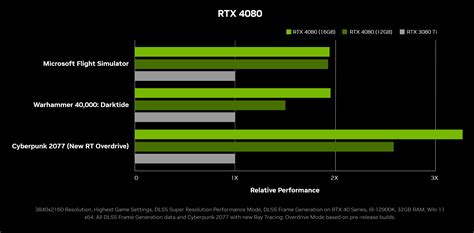
- If you’ve consistently identified a GPU bottleneck, upgrading your graphics card will provide the most significant FPS boost for higher resolutions or graphics settings.
- If your CPU is the bottleneck, a faster processor, often requiring a new motherboard and potentially new RAM, will be necessary to unlock your GPU’s full potential, especially in CPU-intensive games or for high frame rates.
The goal is a balanced system where neither component is overwhelmingly more powerful than the other for your typical use case. For most gamers, a slight GPU bottleneck is preferable.
Conclusion
FPS drops are a common gaming annoyance, but understanding the concept of a bottleneck empowers you to diagnose and address the root cause. By actively monitoring your system’s performance, you can pinpoint whether your CPU or GPU is holding you back and make informed decisions about troubleshooting, optimizing settings, or planning future hardware upgrades. This knowledge is key to ensuring a smoother, more enjoyable, and truly immersive gaming experience.