





How to optimize gaming PC cooling for peak performance?

The Crucial Role of Cooling in Gaming PCs
For any serious gamer, a high-performance PC is key. But raw power means nothing if your system can’t stay cool under pressure. Overheating is the silent killer of gaming performance, leading to thermal throttling, reduced frame rates, and even hardware damage over time. Optimizing your PC’s cooling isn’t just about adding more fans; it’s about creating an efficient thermal environment that allows your components to operate at their peak, reliably and consistently.
Understanding Heat Generation in Your Gaming Rig
Modern gaming PCs house powerful components like CPUs and GPUs, which generate significant heat during demanding tasks. The Central Processing Unit (CPU) and Graphics Processing Unit (GPU) are the primary heat producers, especially during intense gaming. Other components like the chipset, RAM, and even SSDs can contribute to the overall heat load within the case. Effective cooling is about managing this heat by efficiently moving it away from these critical components and out of the PC case.
Mastering Airflow for Optimal Heat Dissipation
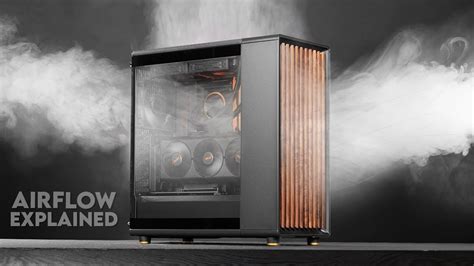
The foundation of good PC cooling lies in proper airflow. Airflow management dictates how cool air enters your case, moves across heat-generating components, and how hot air is expelled. The goal is to create a consistent, unidirectional flow of air. Generally, you want to draw cool air in from the front and bottom of the case and exhaust hot air from the back and top.
Consider the ‘positive pressure’ vs. ‘negative pressure’ debate. Positive pressure (more intake than exhaust) helps keep dust out by forcing air through filtered intakes, while negative pressure (more exhaust than intake) can draw dust in through unfiltered openings. A balanced approach or slight positive pressure is often recommended. Ensure your case fans are positioned strategically for intake (front, bottom) and exhaust (rear, top).
Cable management also plays a critical role. Untidy cables can obstruct airflow, creating ‘dead zones’ where heat can accumulate. Routing cables neatly behind the motherboard tray or along the case’s perimeter ensures unimpeded air pathways.
CPU Cooling Solutions: Air vs. Liquid
The CPU cooler is arguably the most critical component for CPU temperature regulation. You primarily have two choices: air coolers and All-in-One (AIO) liquid coolers.
- Air Coolers: These use a heatsink with fins and heat pipes to transfer heat away from the CPU, which is then dissipated by one or more fans. High-end air coolers can be very effective and are often more affordable and reliable than AIOs.
- AIO Liquid Coolers: These units circulate coolant through a block on the CPU to a radiator, where fans dissipate the heat. AIOs often offer superior cooling performance for high-TDP (Thermal Design Power) CPUs and can look cleaner inside the case, though they come with a slightly higher risk of failure (pump, leaks) and cost.
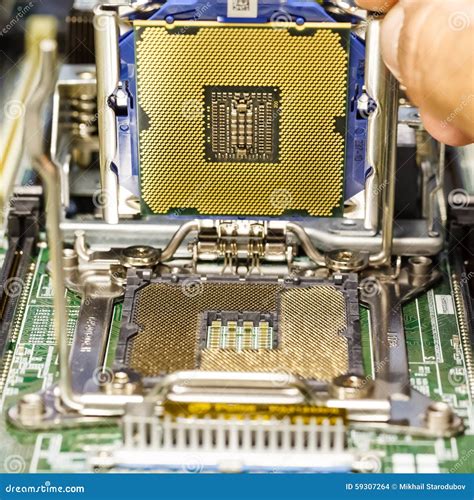
Regardless of your choice, proper application of thermal paste between the CPU and cooler base is essential for efficient heat transfer. Always use a high-quality thermal paste and apply it correctly (e.g., pea-sized dot, line method).
Optimizing GPU Cooling and Case Fans
The GPU is often the biggest heat contributor in a gaming PC. While most GPUs come with competent factory cooling, you can still enhance their performance. Ensuring your case has good airflow around the GPU is paramount. Some users even opt for custom GPU cooling solutions or experiment with undervolting their GPU to reduce heat output without significant performance loss.
For case fans, consider static pressure fans for radiators or restrictive areas and airflow fans for unobstructed intake/exhaust points. Modern motherboards and fan controllers allow you to create custom fan curves, adjusting fan speeds based on component temperatures. This ensures your fans spin faster when temperatures rise during gaming and slower when the system is idle, reducing noise.

Regular Maintenance and Monitoring
Even the best cooling setup needs maintenance. Dust is the enemy of airflow and thermal conductivity. Regularly (every 3-6 months, depending on your environment) clean your PC, focusing on dust filters, fan blades, and heatsinks. A can of compressed air is your best friend here. Consider reapplying thermal paste on your CPU every few years, as it can dry out and become less effective.
Software monitoring tools like HWMonitor, MSI Afterburner, or NZXT CAM allow you to keep an eye on your CPU and GPU temperatures in real-time. Understanding your normal operating temperatures helps you identify when something might be wrong and when your cooling is performing optimally.

Conclusion
Optimizing your gaming PC’s cooling is an ongoing process of smart component selection, thoughtful setup, and diligent maintenance. By focusing on efficient airflow, choosing appropriate CPU cooling, managing GPU thermals, and performing regular cleaning, you can ensure your gaming rig runs cooler, performs better, and lasts longer. Invest the time in perfecting your cooling, and your PC will reward you with uninterrupted, peak performance during your most intense gaming sessions.


