How to optimize gaming mouse DPI & polling rate for competitive FPS?
Unlocking Precision: DPI and Polling Rate for FPS Supremacy
In the high-stakes world of competitive First-Person Shooters (FPS), every millisecond and every pixel of movement counts. Your gaming mouse is a direct extension of your intent, and optimizing its settings is paramount to achieving peak performance. Two fundamental settings often misunderstood but critical to master are DPI (Dots Per Inch) and Polling Rate. Understanding how to fine-tune these can significantly elevate your aim, consistency, and overall gameplay.

Understanding DPI: The Core of Mouse Sensitivity
What is DPI?
DPI, or Dots Per Inch, measures how many pixels your mouse cursor will move on screen for every inch you move your physical mouse. A higher DPI means the cursor moves further with less physical movement, while a lower DPI requires more physical movement for the same cursor distance. Contrary to popular belief, a higher DPI isn’t inherently “better”; what matters is finding a DPI that complements your playstyle and setup.
DPI vs. In-Game Sensitivity
It’s crucial to distinguish between your mouse’s hardware DPI setting and your game’s in-game sensitivity slider. These two work in tandem to determine your effective DPI (eDPI), which is the true measure of your overall sensitivity. The formula for eDPI is: DPI x In-Game Sensitivity = eDPI. Most competitive FPS players aim for a relatively low eDPI (typically between 400-1200) to allow for greater micro-adjustments and control, reducing jitter.
Finding Your Optimal DPI Range
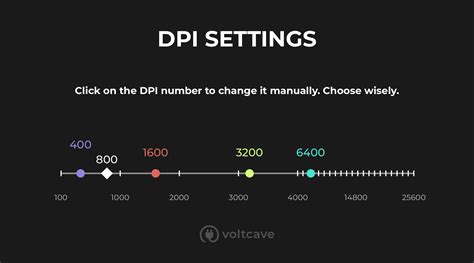
Many professional FPS players opt for a raw DPI setting of 400, 800, or 1600. The key is to select a raw DPI that feels responsive yet controllable on your desktop, then adjust your in-game sensitivity to achieve your desired eDPI. A lower raw DPI (e.g., 400 or 800) often translates to more consistent sensor tracking, as it uses fewer internal calculations by the mouse.
Understanding Polling Rate: The Speed of Communication
What is Polling Rate?
Polling rate, measured in Hertz (Hz), indicates how many times per second your mouse reports its position to your computer. For instance, a 1000Hz polling rate means your mouse updates its position 1000 times every second (or once every millisecond). A higher polling rate reduces input lag, making your cursor movements feel smoother and more immediate.
The Impact on Performance
For competitive FPS, a high polling rate is almost universally recommended. Most modern gaming mice offer options like 125Hz, 250Hz, 500Hz, and 1000Hz. Setting your polling rate to 1000Hz (1ms response time) provides the most responsive and fluid experience, minimizing the delay between your physical movement and the on-screen action. This can be particularly beneficial for tracking fast-moving targets and making quick flick shots.
Potential Downsides and Considerations
While 1000Hz is ideal, some older systems or lower-end CPUs might experience a slight increase in CPU usage. However, for most modern gaming rigs, this impact is negligible. Rarely, certain games or software might have compatibility issues with very high polling rates, though this is becoming less common. Always test your settings thoroughly.
The Synergy: DPI, Polling Rate, and In-Game Sensitivity
Optimizing these settings isn’t about finding the “best” number in isolation, but rather finding the right combination that feels natural and allows for maximum control. Start by setting your mouse’s raw DPI to a common value (e.g., 800) and your polling rate to 1000Hz. Then, enter your game and adjust the in-game sensitivity until you can comfortably perform 180-degree turns with a single sweep of your mouse arm across your mouse pad. From there, make small incremental adjustments until you find your sweet spot.
Practical Steps to Optimize Your Setup
- Choose a Raw DPI: Start with 400, 800, or 1600 DPI on your mouse’s software.
- Set Polling Rate: Max it out to 1000Hz for minimal input lag.
- Adjust In-Game Sensitivity: Fine-tune this slider until your eDPI feels right. Focus on being able to precisely track targets and execute quick turns.
- Consider Your Mouse Pad: A large, low-friction mouse pad is essential for low eDPI settings, allowing for wide, sweeping arm movements.
- Practice and Consistency: Once you find settings that feel good, stick with them. Muscle memory is crucial in FPS games, and constantly changing your sensitivity will hinder its development.

Conclusion: Your Path to Enhanced Performance
Optimizing your gaming mouse’s DPI and polling rate is a personalized journey. There’s no single magic number, but rather a combination that empowers your individual playstyle. By understanding the fundamentals of DPI and polling rate, their combined effect on eDPI, and applying systematic testing, you can unlock a new level of precision and responsiveness in your competitive FPS gameplay. Dedicate time to find your ideal settings, then practice consistently to build the muscle memory that will turn those settings into decisive victories.