





How can I efficiently track major gaming news & updates for *my* favorite titles without daily checks?

The Challenge of Staying Updated in the Fast-Paced Gaming World
For dedicated gamers, keeping tabs on every announcement, patch, and event for a growing library of favorite titles can feel like a full-time job. Daily manual checks across countless websites, forums, and social media feeds are not only time-consuming but often inefficient, leading to information overload or, worse, missed crucial updates. The key to efficient tracking lies in setting up smart systems that deliver the most relevant information directly to you, minimizing effort and maximizing impact.
Leveraging Aggregators and RSS Feeds for a Centralized Hub
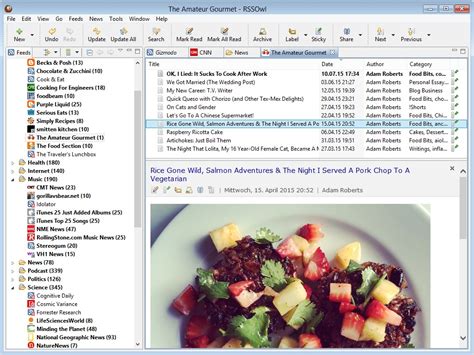
One of the most powerful tools for passive information gathering is an RSS (Really Simple Syndication) feed reader or a news aggregator. These platforms allow you to subscribe to updates from various sources—official game websites, gaming news outlets, developer blogs—and collect them into a single, organized dashboard. Instead of visiting dozens of sites, you simply check your aggregator.
- How it works: Many websites offer RSS feeds, which you can add to readers like Feedly, Inoreader, or even some web browsers.
- Benefits: Centralized view, chronological updates, and often customizable filters to show only what’s most important to you.
Dedicated Game Tracking Platforms & Mobile Apps
Several platforms and apps are designed specifically for gamers to track their libraries and relevant news. While not all offer push notifications, many provide a consolidated view of news, patch notes, and community discussions for games you follow.
- Examples: Steam’s built-in news hub (for PC games), community-driven databases like IGDB (Internet Game Database) which often link to news, or third-party apps that allow you to curate a list of games and pull relevant updates.
- Pro-Tip: Check if your preferred gaming launcher (e.g., Epic Games, Battle.net) has an integrated news feed for your owned titles.
Harnessing Community Power: Forums, Reddit, and Discord
Sometimes, the quickest way to hear about major news is through a passionate community. Dedicated subreddits, official game Discord servers, and game-specific forums are hotbeds of discussion where news often breaks and is analyzed within minutes of release. While these require a bit more active engagement than RSS, strategic use can be highly effective.
- Reddit: Subscribe to specific game subreddits or broader gaming news subreddits. Use Reddit’s notification features for trending posts.
- Discord: Join official developer or large community servers. Many have dedicated ‘news’ or ‘announcements’ channels that are often updated by moderators or even developers themselves. You can configure notifications for these specific channels.
Subscribing to Official Developer Channels and Newsletters
For critical, first-hand information, going straight to the source is often the most reliable method. Most game developers and publishers offer direct communication channels that are perfect for receiving major news without constant checks.
- Email Newsletters: Sign up for newsletters directly on the game’s official website. These are typically used for significant announcements, such as new content releases, major patches, or expansion packs.
- Official Social Media: Follow the game or studio’s official Twitter, Facebook, or Instagram accounts. While these can be noisy, you can often configure social media apps to prioritize notifications from specific accounts or create lists to monitor them separately.
- Developer Blogs: Bookmark developer blogs and check them periodically, or see if they offer an RSS feed.
Curated Content Creators and Gaming Journalists
Another excellent way to get distilled, important news is through content creators and reputable gaming journalism sites. Many YouTubers, podcasters, and websites specialize in news roundups for specific genres or the gaming industry as a whole.
- YouTube Channels: Subscribe to channels that consistently cover news for your favorite games or general gaming news, and enable notifications.
- Podcasts: Listen to weekly gaming news podcasts during your commute or downtime.
- Gaming News Sites: Many major gaming news websites offer daily or weekly email digests, providing a curated summary of the week’s biggest headlines.

Smart Setup Strategies for Minimal Effort
The key to efficiency is not just using the right tools, but setting them up intelligently:
- Consolidate Notifications: Direct alerts from official sources (newsletters, Discord channels) to a single folder or a specific notification setting on your phone, making it easy to review them together.
- Schedule Your Checks: Instead of daily random checks, dedicate 15-30 minutes once or twice a week to review your aggregated feeds, Discord channels, and newsletters. This focused approach is far more productive.
- Prioritize Sources: Determine which sources are most crucial for each game. For example, official newsletters for major announcements and a subreddit for community discussion and patch note analysis.
- Utilize ‘Read It Later’ Apps: If you spot an interesting piece of news but don’t have time to read it immediately, send it to an app like Pocket or Instapaper to review later.

Conclusion
Staying on top of gaming news for your beloved titles doesn’t require a daily grind. By strategically employing a combination of RSS feeds, dedicated tracking platforms, community hubs, official developer channels, and curated content creators, you can build a personalized, efficient system that delivers the most important updates directly to you. This frees up more of your time for what truly matters: playing the games you love.



