How to instantly track all my favorite game updates, patch notes & release dates?

The Quest for Real-Time Gaming Intel
In the fast-paced world of video games, staying on top of every development for your favorite titles can feel like a full-time job. From crucial bug fixes and balance changes in patch notes to exciting new content updates and highly anticipated release dates, information is constantly flowing. Manually checking countless websites, social media feeds, and forums for each game is simply unsustainable. The good news is, with the right approach and tools, you can build an efficient system to instantly track all the gaming intel you need.
Traditional Methods: A Tiring Treadmill
Before diving into modern solutions, it’s worth acknowledging the traditional, albeit often inefficient, methods. Many gamers still rely on visiting official developer websites, following game-specific social media accounts (Twitter, Facebook, Instagram), or subscribing to email newsletters. While these direct sources provide accurate information, they are scattered and require significant time investment. You’re constantly toggling between tabs, sifting through general posts, and hoping you don’t miss a critical announcement amidst the noise.
Gaming news outlets also play a role, aggregating information, but they often focus on major headlines rather than granular patch details for every game you care about. This piecemeal approach quickly leads to information overload and the frustrating realization that you’ve missed something important.
Leveraging Modern Gaming Platforms
Your existing game launchers are often your first line of defense. Platforms like Steam, Epic Games Store, GOG, PlayStation Store, Xbox, and Nintendo eShop frequently feature dedicated news sections, update logs, and wishlist functionalities that notify you about new releases or sales. Steam’s news hub, for instance, aggregates updates from games in your library and wishlist, offering a centralized feed that’s easily accessible. Utilize these built-in features to their fullest, enabling notifications for updates on games you own or plan to purchase.
Specialized Tools and Aggregators
Beyond the launchers, a host of dedicated tools and aggregators can dramatically streamline your tracking process. Many websites and apps specialize in collating release dates across platforms, while others focus on specific genres or even individual popular games (e.g., databases for MMOs like WoWHead or Destiny Tracker). Services that allow you to create a personalized watchlist of games and then pull news, updates, and release info from various official and community sources are invaluable. Look for tools that offer desktop or mobile notifications to truly get instant alerts.

Harnessing Community Power and RSS Feeds
For more niche or detailed updates, the power of community cannot be overstated. Discord servers dedicated to specific games or developers often have channels specifically for announcements, patch notes, and development updates. Reddit communities for popular games are also excellent resources, as passionate players often quickly share and discuss official announcements. Many official game blogs or news pages still offer RSS feeds, which can be subscribed to using an RSS reader. This method provides direct, unfiltered updates as soon as they are published, cutting out the noise of social media algorithms.

Building Your Ultimate Tracking System
The key to instant tracking is a multi-pronged, consolidated approach. Here’s how to build your ideal system:
- Consolidate Your Sources: Identify your favorite games and list their primary official news sources (developer website, forum, social media).
- Choose an Aggregator: Select a gaming news aggregator app or website that allows you to follow specific games or news categories.
- Utilize Launcher Notifications: Ensure notifications are enabled within your primary game launchers for library updates and wishlisted titles.
- Join Key Discord Servers: For your most-played games, join their official or major community Discord servers and set up notifications for announcement channels.
- Consider RSS: If a game provides an RSS feed for its news, integrate it into an RSS reader.
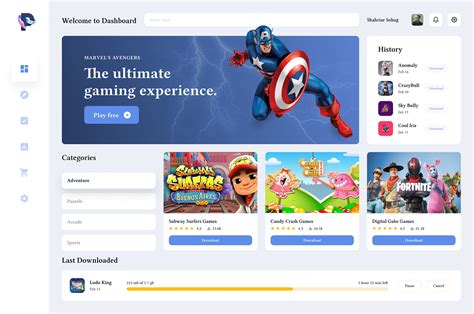
- Personalized Dashboard: If possible, create a personal dashboard (e.g., using a custom browser homepage or a dedicated app) that displays aggregated feeds from all your chosen sources.
The Future of Staying Informed
As the gaming landscape continues to evolve, so too will the tools available for tracking updates. By intelligently combining the built-in features of gaming platforms, specialized tracking apps, and the incredible power of community-driven information sharing, you can create a robust and instant notification system. Say goodbye to FOMO (fear of missing out) and hello to being always in the know about your favorite games, allowing you to focus more on playing and less on endless searching.