





What monitor specs are crucial for competitive FPS gaming setups?
The Competitive Edge: Why Monitor Specs Matter in FPS Gaming
In the fast-paced world of competitive First-Person Shooter (FPS) games, every millisecond counts. While a powerful CPU and GPU are essential for generating high frame rates, the monitor is the window through which you perceive the game. Optimizing your monitor’s specifications can provide a significant competitive advantage, allowing you to react faster, track enemies more accurately, and experience smoother gameplay. Understanding which specs are truly crucial can transform your gaming experience from average to elite.
Refresh Rate: The Speed You Need
The refresh rate, measured in Hertz (Hz), indicates how many times your monitor updates the image on the screen per second. A higher refresh rate means smoother motion and less motion blur. For competitive FPS gaming, this is arguably the most critical specification.
- 60Hz: Standard, but insufficient for competitive play. You’ll miss frames and experience choppier motion.
- 144Hz: The minimum recommended for serious competitive FPS. Offers a noticeable improvement in smoothness and responsiveness.
- 240Hz & 360Hz+: These high refresh rates provide the ultimate fluid experience, allowing for even quicker target acquisition and more precise tracking. While demanding on your system to maintain such high frame rates, they offer a definitive edge for professional players.
Pairing a high refresh rate monitor with a system capable of outputting a matching or higher frame rate is paramount.
Response Time: Eliminating Ghosting
Response time refers to the time it takes for a pixel to change from one color to another, typically measured in milliseconds (ms) from gray-to-gray (GtG). A low response time is crucial to minimize motion blur and ghosting, where traces of previous frames appear on the screen.
- 1ms GtG: This is the gold standard for competitive FPS gaming. It ensures minimal ghosting and the clearest possible image during rapid movement.
- 3-5ms GtG: While acceptable for casual gaming, it can introduce noticeable blur in fast-paced scenarios, potentially hindering performance.
Be wary of marketing claims that use MPRT (Moving Picture Response Time) instead of GtG, as MPRT can often be lower but doesn’t reflect true pixel transition speed in the same way GtG does.
Panel Type: Balancing Performance and Visuals
The monitor’s panel type significantly impacts its response time, color accuracy, and viewing angles. The three main types are TN, IPS, and VA.
- TN (Twisted Nematic): Traditionally the fastest panel type, often achieving 1ms GtG with ease. They are generally the most affordable but suffer from poor color reproduction and narrow viewing angles. For pure competitive advantage where visuals are secondary, TN is a strong contender.
- IPS (In-Plane Switching): Offers excellent color accuracy and wide viewing angles. Newer ‘Fast IPS’ panels have significantly improved response times, often reaching 1ms GtG, making them a popular choice for gamers who want a balance of competitive performance and superior visuals.
- VA (Vertical Alignment): Known for high contrast ratios and deep blacks, offering immersive visuals. However, VA panels typically have slower response times than TN or Fast IPS, often exhibiting noticeable ghosting (especially ‘black smearing’), making them generally less ideal for competitive FPS.
Resolution & Screen Size: Finding the Sweet Spot
Choosing the right resolution and screen size impacts both visual clarity and your system’s performance.
- Resolution:
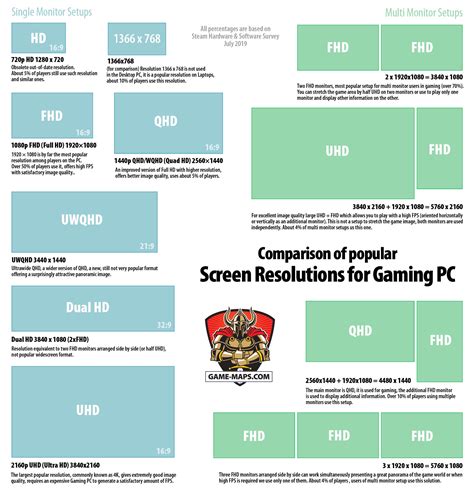
- 1080p (Full HD): Still the most common resolution for competitive FPS. It’s easier for GPUs to maintain extremely high frame rates, which is crucial for high refresh rate monitors.
- 1440p (QHD): Offers a sharper image than 1080p. While requiring a more powerful GPU, modern high-end systems can drive 1440p at high frame rates (144Hz+). It’s a good compromise for those who want better visuals without sacrificing too much performance.
- 4K (UHD): Generally not recommended for competitive FPS. Demands immense GPU power, making it difficult to achieve consistent high frame rates, and the increased pixel density offers diminishing returns in a fast-paced game where precision and speed are key.
- Screen Size:
- 24-27 inches: This range is generally considered optimal. Smaller sizes (24″) allow you to view the entire screen at a glance without moving your eyes much, which is vital for tracking enemies. Larger monitors (27″) can still be good, but beyond that, it becomes harder to keep all critical information in your field of vision without excessive eye movement.
Adaptive Sync Technology: Smooth Gameplay
Technologies like NVIDIA’s G-Sync and AMD’s FreeSync synchronize your monitor’s refresh rate with your GPU’s frame rate. This eliminates screen tearing and minimizes stuttering, providing a much smoother and more fluid visual experience, especially when your frame rate fluctuates.
- G-Sync (NVIDIA): Requires a dedicated hardware module in the monitor, often leading to higher prices. Generally offers a wider variable refresh rate range and superior performance.
- FreeSync (AMD): An open standard, implemented in a wider range of monitors and often more affordable. Modern FreeSync Premium Pro monitors offer excellent performance comparable to G-Sync.
While not strictly necessary if your system can consistently maintain a frame rate above your monitor’s refresh rate, adaptive sync is a valuable feature for ensuring a consistently smooth experience.
Other Crucial Considerations
- Input Lag: This refers to the delay between an action (like a mouse click) and the corresponding visual response on screen. While often tied to response time, it’s a separate metric. Look for monitors with minimal input lag for the most immediate feedback.
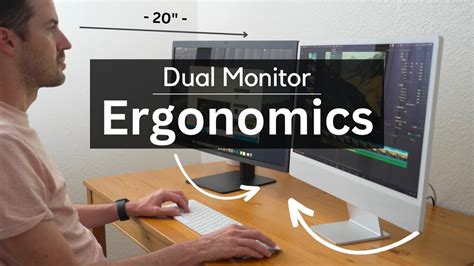
- Ergonomics: A monitor with good adjustability (height, tilt, swivel, pivot) allows you to maintain a comfortable posture during long gaming sessions, reducing fatigue and improving focus. VESA mount compatibility is also a plus for monitor arms.
- Black Stabilizer/Shadow Boost: Many gaming monitors include features that enhance visibility in dark areas without overexposing bright ones, which can be beneficial in competitive FPS games.
Conclusion: Prioritize for Performance
Building a competitive FPS gaming setup means making informed choices about your monitor. Prioritizing a high refresh rate (144Hz+) and an ultra-low response time (1ms GtG) is paramount. Coupled with a suitable panel type (Fast IPS or TN) and an optimal resolution/screen size (1080p/1440p on 24-27 inches), you’ll be well-equipped to maximize your in-game performance. Don’t overlook the benefits of adaptive sync for tear-free gameplay and ergonomic features for comfort. Investing in the right monitor isn’t just about better visuals; it’s about gaining a tangible edge over your opponents and truly experiencing the game as it’s meant to be played.


