How to filter gaming news for updates specific to my favorite games?
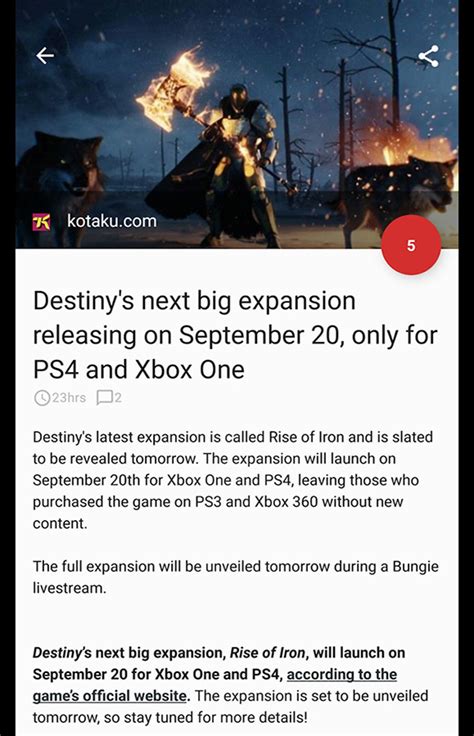
In the vast and ever-expanding universe of video games, staying on top of the latest developments for your favorite titles can feel like an overwhelming task. From new patches and DLC announcements to competitive esports results and community events, the sheer volume of gaming news can quickly lead to information overload. Fortunately, with the right strategies and tools, you can cut through the noise and curate a personalized news feed that delivers exactly what you need about the games you love.
Harnessing Official Developer Channels
The most direct and reliable source for game-specific updates is often the developers and publishers themselves. They are the primary creators of the content and typically announce major news first through their own platforms.
- Official Websites & Blogs: Most games have dedicated websites that serve as central hubs for news, patch notes, and community updates. Bookmark these pages for your most cherished titles and make it a habit to check them periodically.
- Developer Social Media: Follow the official Twitter, Facebook, or Instagram accounts of your favorite games or studios. Social media is often used for quick announcements, behind-the-scenes glimpses, and direct engagement with the community.
- Official Discord Servers: Many developers host active Discord servers where community managers post updates, engage in Q&A sessions, and sometimes even offer early access to news or testing opportunities. Join these servers and configure notifications for relevant channels.
- Email Newsletters: Sign up for newsletters from game publishers. These often consolidate important news, sales, and event information directly to your inbox.
Leveraging News Aggregators and Custom Feeds
While official channels are crucial, specialized tools can help you gather and filter information from multiple sources efficiently.
- Google Alerts: Set up Google Alerts for specific game titles (e.g., “Cyberpunk 2077 update,” “Elden Ring DLC news”). Google will then email you whenever new content matching your search terms appears on the web.
- RSS Feeds: RSS (Really Simple Syndication) remains a powerful tool for monitoring websites. Many gaming news sites and even official developer blogs offer RSS feeds. Use an RSS reader like Feedly or Inoreader to subscribe to these feeds and organize them by game. This allows you to see new posts from all your chosen sources in one consolidated dashboard.
- Specialized Gaming News Sites with Filters: Some larger gaming news outlets (like IGN, GameSpot, PC Gamer) have dedicated game hubs or robust search functions. While not always perfect, searching directly on these sites can often yield more specific results than a general web search. Look for sites that allow you to “follow” specific games.
Tapping into Community-Driven Resources
The gaming community itself is a vibrant source of information, often providing real-time discussions, user-generated guides, and curated news.
- Game-Specific Subreddits: Reddit has thriving communities for almost every popular game. Subreddits like
r/gaming,r/{GameName}(e.g.,r/leagueoflegends), orr/gamedealsare excellent for discussions, news curation by fans, and finding updates quickly. Filter by “New” or “Hot” to see the latest posts. - Fan Wikis and Databases: Comprehensive fan-run wikis (like Fandom wikis) are not just for lore and item stats; they often have sections dedicated to patch histories, upcoming features, and development news, all meticulously cataloged by dedicated fans.
- Independent Content Creators: Many YouTubers, Twitch streamers, and bloggers focus on specific games. Following creators who specialize in your favorite titles can provide insightful analysis and timely updates, often with a unique perspective.

Utilizing Dedicated Tools and Browser Extensions
Technology offers various solutions to streamline your news consumption.
- Gaming News Apps: Some mobile apps are designed specifically for gaming news, allowing you to select your favorite games and receive tailored alerts. Examples might include dedicated apps from major gaming news outlets or independent aggregators.
- Browser Extensions: For platforms like Twitter or YouTube, browser extensions can help filter your feed more aggressively based on keywords or channels, ensuring you only see posts relevant to your chosen games.
- Customizable Dashboards: Services like Netvibes or even personalized homepage setups can allow you to embed widgets for RSS feeds, specific social media accounts, or Google Alerts, creating a single, custom gaming news dashboard.
Conclusion: Crafting Your Personalized Gaming News Hub
By combining official sources with smart aggregation tools and community insights, you can construct a highly effective system for tracking updates on your favorite games. Start by identifying your core titles, then set up a mix of official follows, RSS feeds, and community subscriptions. Regularly review and refine your sources to ensure you’re getting the most relevant, timely, and accurate information. This proactive approach not only saves you time but also ensures you’re always in the loop for the games that matter most to you.