





How do I filter essential gaming news for my favorite titles without endless scrolling?
Tired of Drowning in Gaming News? Here’s How to Filter the Essentials
The gaming world is a vibrant, ever-evolving landscape, with new announcements, patches, events, and releases happening constantly. While staying informed is key to enjoying your favorite titles, the sheer volume of information can be overwhelming. Endless scrolling through social media feeds, general news sites, and forums often leads to information overload, making it hard to find what truly matters to you. Fortunately, with a few smart strategies and tools, you can refine your news intake to focus only on the essential updates for the games you love.
Leverage Dedicated Gaming News Apps and Aggregators
Many platforms specialize in curating gaming news, often with personalization features. Apps like Google News, Apple News, or dedicated gaming news aggregators allow you to follow specific topics, games, or publishers. By setting your preferences, you can receive a personalized feed that prioritizes content relevant to your interests, rather than a generic stream of everything.
Explore apps that offer custom topic creation or let you ‘follow’ games. Some even provide push notifications for breaking news related to your chosen titles. This proactive approach ensures that crucial updates land directly on your device, bypassing the need for manual searching.

Harness the Power of Community and Social Media
While general social media can be a swamp, targeted engagement is incredibly effective. Follow official developer accounts, game publishers, and specific community managers on platforms like Twitter, YouTube, or Facebook. These are often the first places where critical announcements, patch notes, and development updates are shared.
Additionally, dedicated subreddits (e.g., r/[YourFavoriteGame]), Discord servers, and fan forums for your favorite games are goldmines. Communities are excellent at filtering out fluff and highlighting significant news, often with insightful discussions. Join relevant groups and adjust your notification settings to get alerts for key posts or channels.
Utilize RSS Feeds and News Readers for Specific Sites
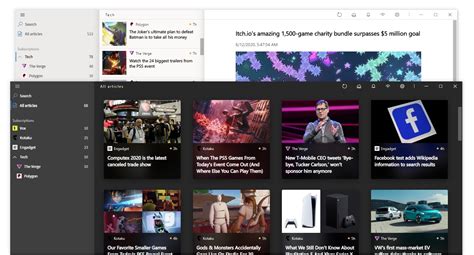
For a truly granular approach, RSS (Really Simple Syndication) feeds are an old but powerful tool. Many gaming websites, blogs, and even developer update pages offer RSS feeds. An RSS reader (like Feedly, Inoreader, or The Old Reader) allows you to subscribe to these feeds, compiling all new articles from your chosen sources into a single, clean interface.
This method gives you complete control. You can subscribe only to the news sections of sites relevant to your games, bypassing general articles you don’t care about. It’s an efficient way to monitor multiple sources without having to visit each website individually.
Personalize Your News Digests and Email Subscriptions
Many gaming outlets and platforms offer email newsletters. Instead of receiving every single newsletter, look for options that allow you to customize the content or frequency. Some services provide daily or weekly digests that summarize the most important news for your selected games or genres.
For example, if you play a specific MMO, its official website likely has an email subscription service that will send you direct updates on new content, maintenance, and community events. Signing up for these highly targeted newsletters can significantly reduce your news-seeking efforts.

Focus on Official Sources and Developer Updates
The most crucial news for any game often comes directly from its creators. Make it a habit to check official game websites, developer blogs, and patch note archives regularly. These sources provide unadulterated, factual information about game changes, upcoming features, and official events.
Often, developer livestreams or Q&A sessions are announced on these official channels. Keeping an eye on these primary sources ensures you’re getting the most accurate and timely information, cutting through speculation and secondary reporting.

Conclusion: Take Control of Your Gaming News Flow
Filtering essential gaming news doesn’t have to be a chore. By strategically utilizing dedicated apps, engaging with specific communities, employing RSS feeds, personalizing your subscriptions, and prioritizing official sources, you can create a streamlined news pipeline. This tailored approach not only saves you from endless scrolling but also ensures you’re always up-to-date with the information that truly enhances your gaming experience, without the overwhelming noise.



