Mod stability: How do communities manage mod conflicts after game patches?
The Inevitable Dance: Game Patches and Mod Instability
For many gamers, mods aren’t just an add-on; they’re an integral part of the experience, transforming beloved titles, fixing long-standing issues, or adding entirely new dimensions of gameplay. However, this vibrant world of customization often collides with the reality of official game patches. When a developer rolls out an update, it can subtly or drastically alter game code, rendering existing mods incompatible and leading to crashes, glitches, or broken features. This moment of instability often throws entire modded communities into a coordinated effort to restore their cherished game states.
Managing mod conflicts after game patches is a complex dance between mod authors, knowledgeable players, and the wider community. It requires communication, patience, and often a significant amount of collaborative troubleshooting. But how exactly do these communities organize themselves to overcome such challenges?

The Immediate Aftermath: Assessing the Damage
The first sign of a patch usually brings a mix of excitement for new content and dread for mod users. The immediate aftermath involves players reporting issues, often on forums, Discord servers, and Reddit. Symptoms range from the game failing to launch, save files corrupting, or specific modded features no longer working as intended. This initial chaos is critical; it’s where the community begins to gather data on what broke and how.
Mod Authors: The Frontline Responders
At the heart of mod stability management are the mod authors themselves. These dedicated creators often work tirelessly to update their mods shortly after a game patch. Their process typically involves:
- Rapid Assessment: Identifying which parts of their mod broke due to the patch.
- Communication: Posting updates on mod pages (Nexus Mods, Steam Workshop, etc.), letting users know the mod is broken, when an update might be expected, or if it has been abandoned.
- Hotfixes and Updates: Releasing new versions of their mods compatible with the latest game patch.
- Deprecation: In some cases, a mod may become permanently incompatible or superseded by official game features, leading the author to deprecate it.
Community-Driven Solutions and Support Networks
While mod authors are busy updating, the community plays a vital role in bridging the gap. Dedicated forums, wikis, and Discord channels become command centers for information sharing and troubleshooting.
Strategies Employed by Communities:
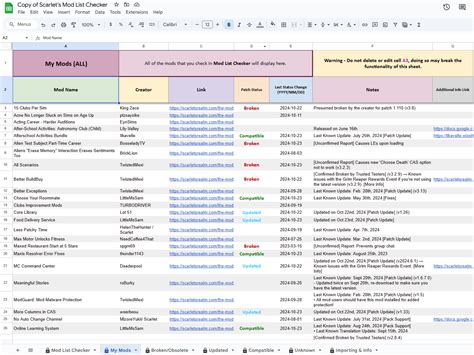
1. Compatibility Lists and Trackers: Many larger modding communities maintain extensive, often user-generated, compatibility lists. These spreadsheets or wiki pages track which mods are confirmed working, broken, or updated for the latest game patch. They often include links to updated versions or workarounds.
2. Temporary Disabling/Uninstallation: The simplest advice for users facing issues is to temporarily disable or uninstall all mods, then reintroduce them one by one to identify the culprit. Communities often guide users through this methodical process.
3. Rollback Options: For games that allow it (e.g., through Steam beta branches for older versions), some communities advise players to roll back their game version to maintain mod compatibility until essential mods are updated. This is a temporary measure, sacrificing new official content for mod stability.
4. Collaborative Troubleshooting: Experienced users help less experienced ones interpret crash logs, identify conflicting mods, and suggest temporary fixes. This often involves detailed guides on proper load orders, patching utilities, and manual conflict resolution.
5. Community Patches and Forks: In instances where a mod author becomes inactive or a fix is urgent, some communities take it upon themselves to create unofficial patches or fork abandoned mods to keep them compatible. This requires skilled individuals within the community and often involves complex legal and ethical considerations, but it speaks to the dedication to mod preservation.
Best Practices for a Stable Modded Experience
For individual players, understanding and participating in these community efforts is key. Best practices include:
- Back Up Your Saves and Mod Folders: Before any game update, create backups.
- Read the Patch Notes: Understand what the official update changes.
- Check Mod Pages and Community Hubs: Actively monitor forums and mod sites for compatibility updates.
- Exercise Patience: Major patches often require mod authors time to update. Avoid playing extensively with an unstable mod setup.
- Report Issues Clearly: If you encounter a bug, provide detailed information in community bug reports.
- Support Mod Authors: Show appreciation for their work, as they are crucial to the modding ecosystem.
The Future of Mod Stability
As games become more complex and modding tools evolve, the dynamic between official patches and mod stability continues to develop. Some game developers are beginning to offer better modding support, stable APIs, or even dedicated modding toolkits to mitigate post-patch breakage. However, the collaborative spirit and ingenuity of modding communities will always remain the cornerstone of managing mod conflicts and ensuring the longevity of personalized game experiences.