Best way to get timely gaming updates & patch notes without endless searching?

Tired of the Digital Wild Goose Chase? Here’s Your Solution
In the fast-paced world of gaming, staying current with the latest updates, bug fixes, and exciting new content can feel like a full-time job. Games evolve rapidly, and missing crucial patch notes can lead to confusion, competitive disadvantages, or simply missing out on vital improvements. The traditional method of constantly checking individual game websites, forums, and developer blogs is not only inefficient but often leaves gamers feeling overwhelmed and behind.
Fortunately, with the right strategies and tools, you can streamline your information flow, ensuring you’re always in the loop without dedicating hours to fruitless searching. Let’s explore the best ways to get timely gaming updates and patch notes directly to you.
Leveraging Official Channels Effectively
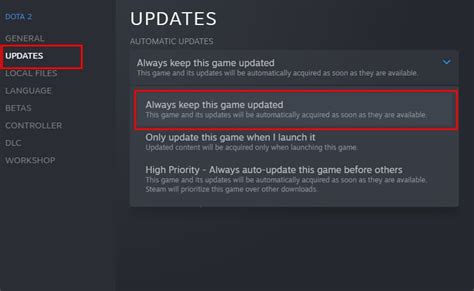
While individual game websites can be tedious to monitor, official channels remain the most authoritative source for information. The key is to subscribe and automate. Most developers and publishers have dedicated news sections, blogs, or press releases that announce updates. Instead of manually visiting, look for RSS feeds, email newsletters, or direct notification options within the game launcher itself.
- Developer Blogs & Websites: Many studios maintain active blogs where they post detailed patch notes. Bookmark these and check them regularly, or better yet, subscribe to their RSS feeds if available.
- Game Launchers: Platforms like Steam, Epic Games Store, Battle.net, and others often integrate news feeds and patch notes directly into their client interfaces. Customizing your library to show recent updates for your owned games can be incredibly helpful.
- Official Social Media: Follow developers and publishers directly on platforms like Twitter, Facebook, or even Reddit. Many use these channels for immediate announcements, though comprehensive patch notes usually link back to a dedicated blog post.

Aggregators, Community Hubs & Dedicated News Sites
Beyond official channels, a multitude of services and communities exist solely to aggregate gaming news and updates, saving you the legwork. These can be goldmines for cross-game information.
Specialized Gaming News Websites
Sites like IGN, PC Gamer, Eurogamer, and many others have dedicated sections for game updates and breaking news. While they might not always provide the full patch note details, they excel at summarizing major changes and pointing you to the official source. Many offer email newsletters or push notifications for breaking stories.
Community-Driven Platforms: Reddit & Discord
Reddit hosts countless subreddits dedicated to specific games (e.g., r/LeagueofLegends, r/ELDENRING). These communities are often the first to discuss, dissect, and even share leaked or upcoming information. Subscribing to relevant subreddits and filtering by “News” or “Updates” flair can be incredibly effective. Similarly, Discord servers, both official and fan-run, often have dedicated channels for announcements and patch notes, sometimes even with bots that pull information directly from developer APIs.
Streamlining Your Information Flow with Tools
To truly conquer the update overload, integrate some smart tools into your routine:
- RSS Readers: Tools like Feedly or Inoreader allow you to subscribe to RSS feeds from developer blogs, gaming news sites, and even specific forum threads. Consolidate all your gaming news into one easy-to-digest feed.
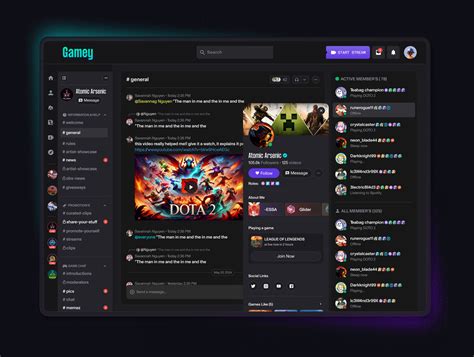
- Notification Bots: For Discord, many bots can be configured to post updates from game APIs or specific RSS feeds into your server channels. This is excellent for group play or keeping track of multiple titles.
- Custom Twitter Lists: Create a private Twitter list containing only game developers, publishers, and trusted gaming news outlets. This allows you to quickly scan a curated feed without the noise of your main timeline.
Creating Your Personalized Update Dashboard
The best strategy involves a combination of these methods, tailored to your specific gaming habits. Consider creating a “gaming dashboard” of sorts:
- Prioritize Your Games: Which games do you absolutely need immediate updates for?
- Identify Primary Sources: For those priority games, find their official dev blogs, Twitter accounts, and Discord servers.
- Automate Where Possible: Use RSS feeds for blogs, Discord bots for server alerts, and email subscriptions for newsletters.
- Utilize Aggregators: Supplement with a general gaming news site or a carefully curated Twitter list for broader industry news or updates on less critical titles.
- Set Aside Dedicated Time: Instead of endless searching, dedicate 10-15 minutes a day or every few days to check your curated feeds.
By taking a proactive, organized approach, you can transform the daunting task of staying informed into a seamless, efficient process. Spend less time searching and more time enjoying your favorite games, always equipped with the latest knowledge.