





Gamers: How to efficiently filter essential game updates from overwhelming news feeds?

In the fast-paced world of gaming, keeping up with the latest updates, patches, DLCs, and announcements can feel like an impossible quest. Every day, countless news outlets, social media feeds, forums, and official channels barrage gamers with an overwhelming deluge of information. The challenge isn’t finding news; it’s sifting the essential from the expendable. This guide will equip you with practical strategies to efficiently filter the noise and focus on the updates that truly impact your gaming experience.
The Deluge: Understanding Information Overload
The sheer volume of content produced around video games is staggering. From indie titles to AAA blockbusters, every game generates a continuous stream of news: development diaries, patch notes, esports results, community highlights, fan theories, and much more. While a vibrant information ecosystem is generally positive, for the individual gamer, it often leads to burnout and the feeling of missing out on critical updates.
This constant stream can make it difficult to identify what’s truly important for the games you play, the genres you love, or the hardware you use. Without a strategic approach, your time can quickly be consumed by irrelevant headlines, leaving you uninformed about the changes that matter most.

Leverage Official Channels Directly
The most reliable and direct source of essential updates comes from the creators themselves. Bypass third-party interpretations and go straight to the source:
- Developer Blogs & Websites: Most game developers and publishers maintain official blogs or news sections on their websites. These are typically the first places to announce major patches, expansions, or game-breaking issues.
- Official Forums: Active game-specific forums often have dedicated sections for patch notes, developer Q&As, and direct announcements from community managers.
- Publisher Newsletters: Sign up for email newsletters from publishers whose games you frequently play. These often provide concise summaries of key updates, release schedules, and exclusive content.
- In-Game News Feeds: Many modern games include a built-in news feed or launcher that highlights the latest patch notes or events directly upon startup.
Curate Your Social Media Feeds
Social media can be a powerful tool for real-time updates, but it requires careful curation to prevent overload:
- Follow Key Accounts: Only follow the official accounts of games, developers, and publishers that are genuinely important to you. Unfollow or mute accounts that frequently post irrelevant content.
- Use Lists (Twitter): Create private lists for specific game genres or titles. This allows you to view a filtered feed without cluttering your main timeline.
- Mute Keywords: Most platforms allow you to mute keywords or hashtags. Use this feature to block out spoilers for games you haven’t played or topics you simply don’t care about.
- Engage Selectively: Limit your interaction to discussions that provide valuable insights rather than just noise.

Utilize Dedicated Gaming Hubs and Aggregators
Several platforms specialize in consolidating gaming news, making it easier to track multiple sources:
- Gaming News Aggregators: Websites like Metacritic, OpenCritic, or specific game journalism sites often have sections dedicated to news. Some even allow for personalized feeds.
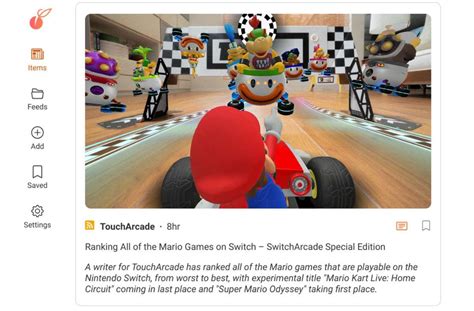
- RSS Feeds: If your favorite news sites offer RSS feeds, use an RSS reader (like Feedly) to gather all headlines in one place, allowing you to quickly scan and identify important articles.
- Discord Servers: Many games and gaming communities have official or fan-run Discord servers. These often have dedicated channels for announcements, patch notes, and news, sometimes even with bots that pull information directly from official sources.
Implement Notification Tools & Personal Filters
Take an active role in defining what information reaches you:
- Google Alerts: Set up Google Alerts for specific game titles, developer names, or keywords you’re interested in. You’ll receive email notifications when new content matching your criteria appears online.
- Browser Extensions: Some browser extensions can help filter content or highlight specific keywords on web pages, though this is less common for general news.
- YouTube Subscriptions: Subscribe only to channels that consistently deliver valuable updates or analyses for your games, rather than those focused on trends or speculation.
Prioritize and Personalize Your Focus
Ultimately, efficient filtering comes down to knowing what matters to you personally:
- Identify Core Games: Make a list of the 3-5 games you are actively playing or most anticipate. Focus your energy on monitoring updates for these titles above all others.
- Define Your Interests: Are you primarily interested in competitive balance changes, story updates, new content, hardware compatibility, or community events? Tailor your filtering strategy to these specific interests.
- Schedule Your News Consumption: Instead of passively consuming news all day, dedicate specific times to check your curated feeds. This reduces distraction and makes the process more efficient.

The Power of Trustworthy Community
While official sources are paramount, a well-chosen community can act as an excellent secondary filter:
- Trusted Friends: Your gaming friends are often your first line of defense against irrelevant news, sharing only what they know you’ll care about.
- Reputable Streamers/Content Creators: Some content creators excel at summarizing weekly or monthly updates for specific games or genres, saving you time.
- Curated Subreddits: Many game-specific subreddits have excellent moderation, often featuring stickied posts for patch notes or major announcements, effectively cutting through fan art and memes.

Conclusion
Navigating the vast sea of gaming news doesn’t have to be a source of stress. By proactively curating your information sources, leveraging official channels, and utilizing smart tools, you can transform an overwhelming experience into an efficient and enjoyable one. Take control of your news feed, filter out the noise, and ensure you’re always informed about the updates that genuinely enhance your passion for gaming.



