





How to personalize gaming news updates to only see what’s relevant to *my* games?
Navigating the Deluge: Why Personalized Gaming News Matters
In the vast, ever-expanding universe of video games, staying updated can feel like an insurmountable quest. Every day brings a torrent of announcements, patches, leaks, and reviews across countless titles. For many gamers, sifting through this deluge to find news relevant only to the games they actually play can be a frustrating, time-consuming endeavor. The good news is, you don’t have to wade through it all. With a few smart strategies and tools, you can tailor your gaming news feed to focus exclusively on the titles that matter most to you, transforming information overload into a personalized, efficient update system.
Harnessing Dedicated News Aggregators and Apps
One of the most straightforward ways to personalize your news is by utilizing dedicated gaming news aggregators or general news apps with strong filtering capabilities. Many popular news platforms allow you to follow specific topics, companies, or even individual game titles. Apps like Google News, Flipboard, or even dedicated gaming news apps often have features to “follow” or “favorite” games. By setting up these preferences, the app’s algorithm will prioritize content related to your chosen titles, pushing it to the forefront of your feed.
Consider exploring specialized gaming platforms or community hubs that offer customized feeds. Some game launchers or platforms (like Steam’s news hub or specific game client news feeds) already provide updates for games in your library, but you can often go further by subscribing to official developer blogs or community news feeds directly within those ecosystems.
Leveraging Social Media and Content Creators
Social media platforms like X (formerly Twitter), Facebook, and Reddit are invaluable for real-time updates and community insights. To personalize effectively:
- Follow Official Channels: Subscribe to the official accounts of game developers, publishers, and the specific games you play. These are often the first to announce major updates, events, or patch notes.
- Engage with Subreddits and Forums: Join dedicated subreddits for your favorite games. These communities are excellent for user-generated content, discussions, and quick sharing of news, often with highly curated information by passionate fans.
- Curate Your Feed: Use lists on X or create custom feeds on other platforms to group your essential gaming sources, making it easier to scan for relevant information without the noise.

Beyond traditional social media, YouTube and Twitch are powerful platforms for gaming news. Subscribe to content creators, official game channels, and reputable gaming news outlets that cover your specific games. Many streamers and YouTubers specialize in single games or genres, providing deep dives and rapid updates.
Mastering RSS Feeds and Email Subscriptions
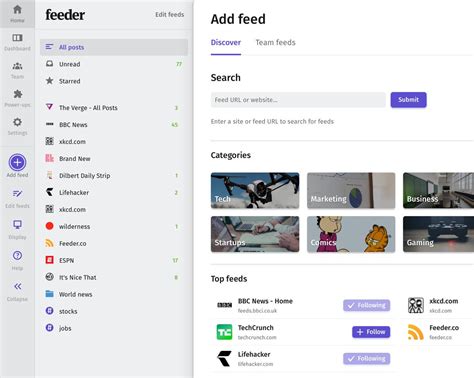
For a more “hands-on” approach, RSS (Really Simple Syndication) feeds remain a powerful tool for tech-savvy gamers. Many gaming news websites, developer blogs, and even patch note pages offer RSS feeds. By using an RSS reader (like Feedly or Inoreader), you can compile a custom list of sources and filter them by keywords or categories, ensuring only articles mentioning your specific games appear in your personal feed.
Similarly, signing up for email newsletters directly from game publishers or specific game websites can provide highly targeted updates. While this might lead to more emails, it ensures you get critical news directly from the source, often with exclusive content or early access announcements.
Strategies for Optimal Curation
Personalizing your gaming news isn’t a one-time setup; it’s an ongoing process:
- Define Your Core Games: Make a list of your absolute must-know titles. This helps in narrowing down your focus.
- Regularly Review Sources: Unfollow or unsubscribe from sources that no longer provide relevant content or that clutter your feed.
- Utilize Mute/Filter Features: Most social media platforms and news apps allow you to mute keywords or specific accounts, further refining what you see.
- Balance Official with Community: While official sources are crucial, community discussions often highlight nuances, bugs, or player-discovered features that official channels might miss.
The Benefits of a Tailored News Experience
By taking control of your gaming news, you’ll immediately notice several advantages. You’ll save significant time no longer sifting through irrelevant articles. Your gaming experience will be enriched by staying informed about updates, events, and community discussions directly impacting your favorite titles. Furthermore, a focused news feed reduces cognitive overload, allowing you to enjoy your hobby without the stress of missing out on crucial information for the games you genuinely care about.

Empower Your Gaming Journey
Personalizing your gaming news is about empowering yourself as a gamer. It’s about optimizing your information intake to match your passion. By employing a combination of dedicated apps, strategic social media use, RSS feeds, and consistent curation, you can build a news ecosystem that brings the most relevant updates directly to you, making your time spent gaming and staying informed more enjoyable and efficient than ever before.



