How to quickly find *only* the gaming news relevant to *my* specific games?
In the vast and ever-expanding universe of video games, staying updated on every single title is an impossible task. The deluge of daily announcements, patches, trailers, and esports results can quickly become overwhelming, burying the specific news you actually care about. If you’re tired of sifting through irrelevant headlines to find that crucial update for your favorite RPG or upcoming competitive shooter, you’re in the right place. This guide will help you cut through the noise and build a personalized news pipeline focused *only* on the games that matter most to you.
Harnessing Official Channels
The most direct and reliable source for news on a specific game is often its official channels. Developers and publishers pour resources into maintaining direct lines of communication with their player base. Start by bookmarking the official website or blog for each of your key games. These platforms are typically the first to announce major updates, patch notes, new content, and development roadmaps.
Beyond websites, follow the official social media accounts (Twitter, Facebook, Instagram, YouTube) for the game and its developer. Many studios use these platforms for quick announcements, community interaction, and sharing new media. Consider creating a dedicated social media list or custom feed to keep these updates separate from your general feed.

Leveraging Community Hubs
While official channels are crucial, player communities offer a different, equally valuable perspective, often providing deeper discussions, fan theories, and quick dissemination of news from various sources. Reddit is a powerful tool here; most popular games have dedicated subreddits where news, discussions, and developer interactions are frequent. Subscribe to these specific subreddits and customize your Reddit feed to prioritize them.
Discord servers have also become central hubs for many gaming communities. Join the official Discord server for your games to receive real-time announcements, participate in Q&A sessions, and engage directly with fellow players and sometimes even developers. Many servers have dedicated “announcements” channels that act as a direct news feed.

Smart Aggregators and RSS Feeds
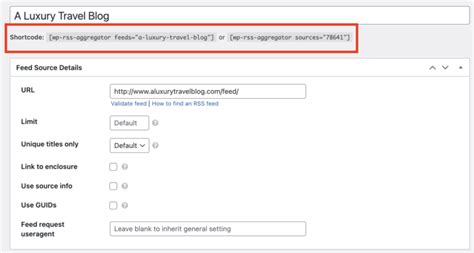
For a more automated approach, news aggregators and RSS feeds can be invaluable. Services like Feedly allow you to subscribe to RSS feeds from various gaming news sites, blogs, and official game channels. You can then create custom feeds or folders specifically for your games, ensuring only relevant articles appear in your curated stream.
Google Alerts is another powerful, free tool. Set up alerts for the exact names of your games, developers, or even specific keywords (e.g., “Cyberpunk 2077 patch 2.1”). Google will then email you whenever new content matching your criteria appears on the web. This is excellent for catching news from sources you might not normally follow.
Curated Content & Specialized Media
Sometimes, the best source of relevant news comes from individuals or outlets that specialize in a niche. Identify YouTube channels, Twitch streamers, or specialized gaming websites that focus heavily on the games you play. These creators often provide in-depth analysis, breakdown complex patch notes, and quickly report on news that might be buried elsewhere.
For example, if you’re into a specific genre like fighting games, following dedicated fighting game news sites or content creators will yield far more relevant information than a general gaming news outlet. Build a list of these trusted sources and regularly check their content or subscribe to their newsletters.

Advanced Tips for Staying Hyper-Relevant
- Browser Extensions: Some browser extensions can help filter content or aggregate specific types of news from websites you visit.
- Mobile Apps: Look for dedicated gaming news apps that offer customization options, allowing you to follow specific games or companies.
- Email Newsletters: Many developers, publishers, and specialized gaming sites offer email newsletters. Sign up for those directly related to your games of interest.
- Calendar Integration: For major release dates or announcement events, add them to your personal calendar with alerts.
By combining a few of these strategies, you can construct a robust and highly personalized system for tracking gaming news. Instead of being drowned by a torrent of information, you’ll have a clear, focused stream of updates tailored precisely to your gaming interests, saving you time and ensuring you never miss a beat for the games you love.