





Optimize PC airflow for lower gaming temps: Fan setup guide?
The Critical Role of PC Airflow for Gaming Performance
For any serious PC gamer, high temperatures are the arch-nemesis of performance, stability, and hardware longevity. When your CPU and GPU get too hot, they start to throttle, leading to frame rate drops, stuttering, and even system crashes. While advanced coolers are essential, they can only do so much without a well-managed internal environment. This guide will walk you through optimizing your PC’s airflow through smart fan setup, ensuring your components stay cool even during the most demanding gaming sessions.
Effective airflow management is about more than just adding more fans; it’s about creating a consistent, directed path for air to enter, circulate, and exit your PC case. This methodical approach is what truly separates a well-cooled system from one struggling with thermal issues.
Understanding Airflow Principles: Intake vs. Exhaust
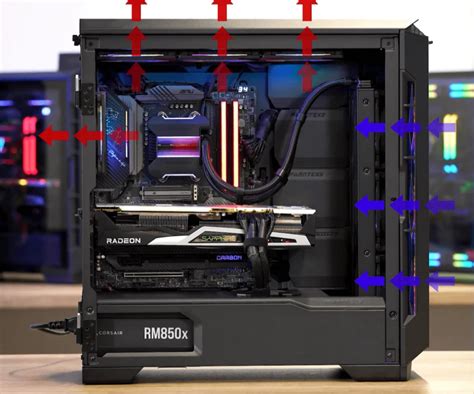
The foundation of good PC cooling lies in understanding the basic principles of air movement within your case. Fans are categorized primarily as either ‘intake’ or ‘exhaust’. Intake fans pull cooler air from outside the case into the system, while exhaust fans push hot air out. The balance between these two creates a pressure dynamic crucial for cooling efficiency.
- Positive Pressure: More air is pulled into the case than is exhausted. This creates a slight internal pressure that helps keep dust out by forcing air through small gaps.
- Negative Pressure: More air is exhausted than is pulled in. This can lead to dust being sucked in through unfiltered openings, potentially coating internal components.
- Balanced Pressure: An ideal scenario where intake and exhaust are nearly equal, offering good cooling without excessive dust accumulation.

Choosing the Right Fans and Optimal Placement
Not all fans are created equal. Fans are typically measured by their size (e.g., 120mm, 140mm) and optimized for either airflow (CFM – cubic feet per minute) or static pressure. Airflow-optimized fans are best for unrestricted areas, while static pressure fans excel when pushing air through radiators or dense obstacles.
Strategic placement is key. Here are the common locations and their roles:
- Front Fans: Almost always intake, bringing fresh air directly over your storage drives and into the main component area.
- Rear Fan: Typically exhaust, directly behind the CPU cooler, expelling hot air out.
- Top Fans: Can be intake or exhaust, but are most often exhaust due to hot air rising. They’re excellent for expelling heat from the CPU and VRMs.
- Bottom Fans: Less common, usually intake, useful for providing fresh air to GPUs in cases with good clearance.
Building Effective Fan Configurations
While case designs vary, a few common configurations tend to yield the best results for gaming PCs:
- Classic Front-to-Back: Two or three front intake fans, one rear exhaust fan. This creates a clear path for air across the CPU and GPU. Often supplemented by one or two top exhaust fans for even better heat dissipation.
- Top Exhaust Dominant: Similar to above, but with more emphasis on top exhaust, especially if you have an AIO cooler mounted at the top. This configuration is excellent for GPU heat, as hot air naturally rises and is quickly expelled.
- Positive Pressure Focus: Slightly more intake fans or higher RPM intake fans compared to exhaust. This helps minimize dust ingress. Ensure your intake fans have good dust filters.
Experimentation is encouraged. The optimal setup depends heavily on your specific PC case, its internal layout, and the heat output of your components.
The Unsung Hero: Cable Management and Obstructions
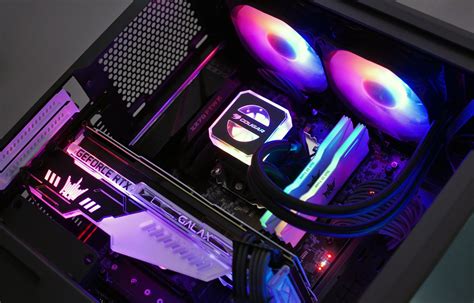
Even with the perfect fan setup, poor cable management can severely choke airflow. A tangle of cables acts as an obstruction, creating dead zones where air stagnates and heat builds up. Take the time to route your cables neatly behind the motherboard tray or along the edges of the case.
Furthermore, ensure there are no other internal obstructions like unneeded drive cages or poorly placed components blocking the main airflow pathways. Every bit of clear space contributes to better thermal performance.
Monitoring and Fine-Tuning Your Cooling Solution
Once you’ve configured your fans, it’s crucial to test and monitor your temperatures. Use software like HWMonitor, MSI Afterburner, or NZXT CAM to track CPU and GPU temperatures during gaming. Pay attention to both idle and load temperatures.
Run stress tests or your favorite demanding games and observe the temperature curves. If temperatures are still higher than desired, consider:
- Adjusting fan speeds (via BIOS or fan control software).
- Swapping fan orientations (e.g., top intake to top exhaust).
- Adding more fans if your case allows.
- Cleaning dust filters regularly.
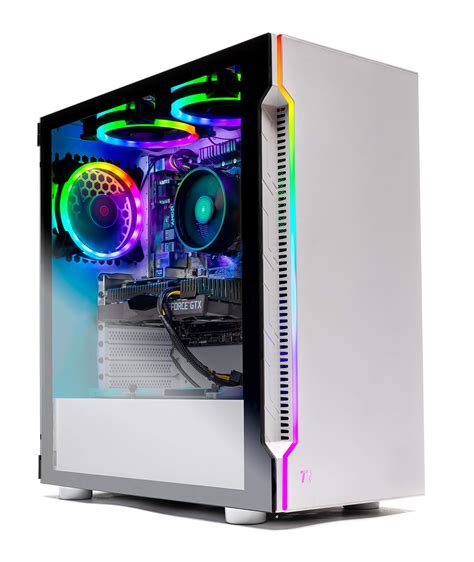
Conclusion: A Cooler PC for a Better Gaming Experience
Optimizing your PC’s airflow through a thoughtful fan setup is one of the most cost-effective ways to improve gaming performance and prolong the life of your hardware. By understanding the basics of intake and exhaust, strategically placing your fans, managing cables, and regularly monitoring your temperatures, you can create a highly efficient cooling system that keeps your gaming rig running smoothly and quietly, even under heavy load. Invest the time in perfecting your airflow, and your PC will thank you with lower temperatures and a more stable, enjoyable gaming experience.


