Which critical performance metrics must all PC gaming reviews cover comprehensively?
The Imperative of Rigorous Performance Analysis in PC Gaming Reviews
In the dynamic world of PC gaming, a truly insightful review extends far beyond subjective opinions on gameplay or story. For the discerning gamer, particularly those investing in new titles or hardware, a comprehensive understanding of a game’s technical performance is paramount. This requires reviewers to go beyond mere impressions and delve into a standardized, objective analysis of critical performance metrics. Ignoring these key data points leaves readers in the dark, unable to make informed purchasing decisions or gauge a game’s true optimization.
Framerate (FPS): The Foundation of Smoothness
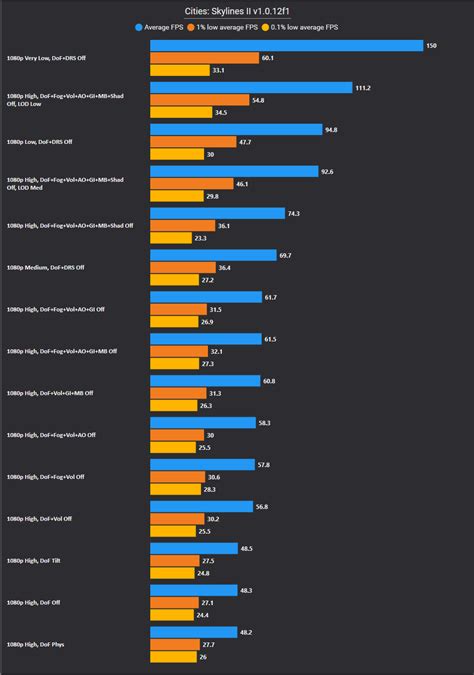
The most widely recognized performance metric is Frames Per Second (FPS), indicating how many individual images your system can render and display each second. While an average FPS is a good starting point, a comprehensive review must delve deeper. Crucially, it needs to include:
- Average FPS: A general indicator of performance across a benchmark run.
- 1% Lows and 0.1% Lows: These metrics are vital. They represent the lowest 1% and 0.1% of framerates recorded, giving an accurate picture of the worst performance spikes or drops experienced. High average FPS with poor 1% or 0.1% lows suggests a stuttery experience, despite what the average might imply.
- Framerate Stability: How consistent is the framerate? Are there frequent, jarring dips, or is it mostly steady? A stable 60 FPS often feels smoother than an average of 80 FPS with wild fluctuations.
Frametime Consistency: Beyond Raw FPS Numbers
While FPS tells you how many frames are rendered, frametime (measured in milliseconds, ms) tells you how long each frame takes to render. Consistent frametimes are just as, if not more, important than high average FPS for a smooth gaming experience. Irregular spikes in frametimes, even if brief, manifest as micro-stutters that are incredibly disruptive and noticeable, even if the overall FPS average remains high. Reviewers must plot frametime graphs to illustrate this consistency (or lack thereof), highlighting any instances of stuttering that might not be obvious from FPS numbers alone.
Input Latency and Responsiveness
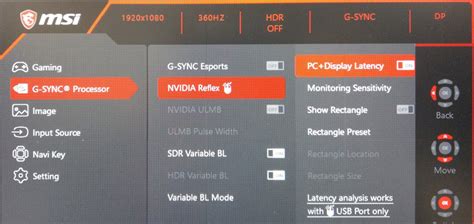
Input latency, often referred to as input lag, measures the time it takes from a physical input (like a mouse click or key press) to the corresponding action being displayed on screen. This metric is absolutely critical for competitive games and any title where precision and reaction time matter. High input lag can make a game feel sluggish and unresponsive, irrespective of its framerate. While challenging to measure consistently without specialized hardware (like NVIDIA’s Reflex Latency Analyzer or high-speed cameras), a thorough review should at least discuss the subjective feeling of input responsiveness and, where possible, provide objective measurements or comparisons.
Hardware Utilization and Scalability Across Tiers
A comprehensive review must detail how a game utilizes various hardware components and how well it scales across different PC configurations. Key aspects include:
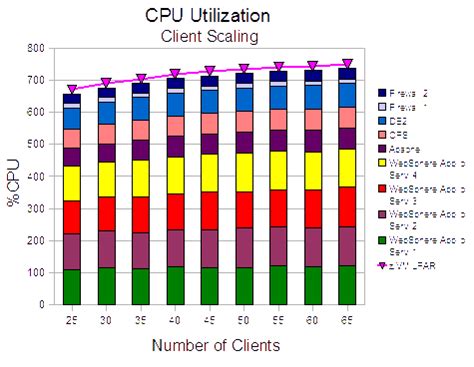
- CPU Utilization: Is the game CPU-bound, or does it leverage multiple cores efficiently?
- GPU Utilization: Is the GPU being fully utilized, or is it bottlenecked by the CPU or other factors?
- VRAM Usage: How much video memory does the game consume at different resolutions and texture settings? This is crucial for gamers with less powerful GPUs.
- RAM Usage: General system memory consumption.
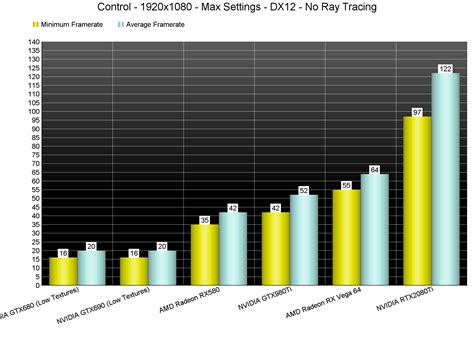
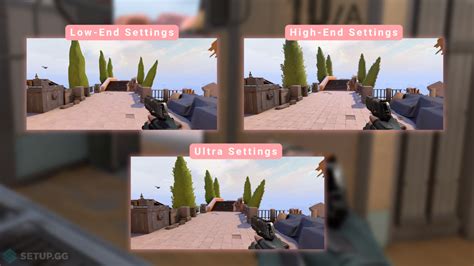
- Scalability Testing: Reviewers should test the game on a range of hardware (e.g., entry-level, mid-range, high-end) and across different graphics settings (low, medium, high, ultra) to assess how well optimized the game is and help readers identify appropriate settings for their own systems.
Impact of Graphical Settings and Feature Implementations
Beyond raw performance numbers, reviews need to articulate the visual impact of different graphical settings. How much visual fidelity is gained by moving from ‘High’ to ‘Ultra’? Does a particular setting (e.g., ray tracing, DLSS/FSR) offer significant visual improvements at a reasonable performance cost? Comparisons with and without these advanced features, including screenshots or video, are invaluable. Benchmarks should ideally be run at multiple common resolutions (e.g., 1080p, 1440p, 4K) to cater to a broader audience.
Stability and Bug Reporting
While not strictly a ‘performance metric,’ a game’s stability is undeniably a critical technical aspect. Reviews must report on:
- Crashes and Freezes: Frequency and circumstances under which they occur.
- Persistent Bugs: Game-breaking or highly irritating bugs that impact the experience.
- Driver Compatibility: Any issues with specific GPU drivers (e.g., NVIDIA, AMD).
- Loading Times: Are they excessively long, or are they acceptable, especially with SSDs?

Conclusion: Empowering the PC Gamer
For a PC gaming review to be truly valuable, it must move beyond subjective critique and embrace a rigorous, data-driven approach to technical performance. By consistently covering framerate (average, 1% lows, 0.1% lows), frametime consistency, input latency, detailed hardware utilization, scalability, the impact of graphical settings, and overall stability, reviewers empower their audience. This level of comprehensive analysis transforms a review from a simple opinion piece into an essential tool for gamers looking to understand, optimize, and ultimately enjoy their PC gaming experiences to the fullest.