





Best PC fan setup for silent gaming and optimal GPU/CPU temps?

Introduction: The Quest for Quiet Power
For many PC gamers, the ideal setup involves a powerful machine that stays cool under pressure without sounding like a jet engine taking off. Juggling optimal GPU and CPU temperatures with minimal noise levels is a delicate balancing act, and your PC’s fan configuration is at the heart of it. This guide will walk you through the principles and best practices for setting up your fans to achieve a silent, yet high-performance, gaming experience.
Understanding Airflow Fundamentals
Effective cooling hinges on proper airflow. Simply put, you want to get cool air into your case, direct it over your heat-generating components (CPU, GPU, VRMs), and then exhaust the hot air out. Without a clear path, air can recirculate, leading to hotspots and diminished cooling efficiency.
Key concepts include intake (fans drawing air into the case) and exhaust (fans pushing air out). Most modern PC cases are designed to facilitate this, often with front and bottom panels for intake and rear and top panels for exhaust.
Positive vs. Negative vs. Balanced Pressure
- Positive Pressure: More intake air than exhaust. This helps prevent dust buildup by forcing air out through small cracks and openings, reducing reliance on dust filters. However, it can sometimes trap heat if not properly managed.
- Negative Pressure: More exhaust air than intake. This is often easier to achieve but can draw dust in through unfiltered openings. It also might lead to components fighting for cool air if intake is insufficient.
- Balanced Pressure: Roughly equal intake and exhaust. Generally considered the ideal, as it provides a steady flow of fresh air while efficiently removing hot air, minimizing dust without creating vacuums or dead spots.

Choosing the Right Fans for the Job
Not all fans are created equal. Different fan designs excel in different situations:
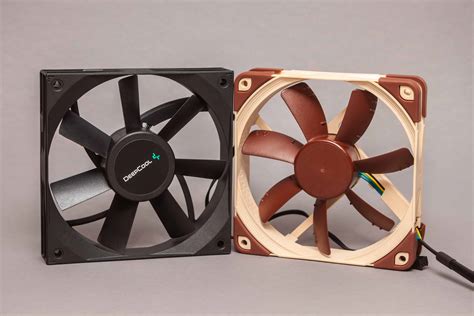
- Airflow Fans: Designed to move a large volume of air with minimal resistance. Ideal for unrestricted areas like front intakes or top exhausts where there’s no radiator or dense mesh in the way. They typically have more blades, wider gaps between blades, and a less aggressive blade angle.
- Static Pressure Fans: Designed to push air through restrictive environments, such as CPU coolers, GPU radiators, or cases with restrictive front panels. They have fewer, thicker blades with a steeper pitch to create higher pressure.
For silent operation, look for fans that use fluid dynamic bearings (FDB) or magnetic levitation bearings (ML), as these are typically quieter and more durable than sleeve or rifle bearings. Pulse Width Modulation (PWM) fans are also highly recommended, as they allow for precise speed control via your motherboard, enabling you to create custom fan curves.

Mastering Fan Control and Software
The secret to silent gaming lies in intelligent fan control. You don’t need your fans spinning at full blast when your system is idle or lightly loaded. Modern motherboards offer extensive fan control options through their BIOS/UEFI settings, allowing you to create custom fan curves that adjust fan speed based on CPU or GPU temperatures.
Third-party software like FanControl, Argus Monitor, or even some motherboard vendor utilities (e.g., ASUS AI Suite, MSI Dragon Center) offer even more granular control. You can set fans to respond to the hottest component, define minimum RPMs for silent idling, and ramp up aggressively only when temperatures demand it. Experiment with different curves to find the sweet spot between noise and cooling for your specific hardware.
Optimal Fan Configurations for Silent Gaming & Temps
While every case is different, here are some generally effective configurations:
1. The Balanced Approach (Most Common & Recommended)
- Intake: 2-3 x 120mm or 140mm fans at the front.
- Exhaust: 1 x 120mm/140mm fan at the rear, 2 x 120mm/140mm fans at the top.
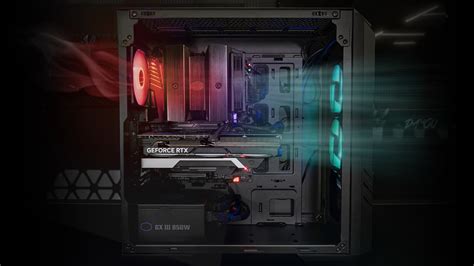
This setup creates a good flow from front to back and bottom to top, ensuring fresh air reaches both your CPU and GPU. Aim for slightly positive or balanced pressure. For silence, run these fans at lower RPMs during idle/light load and have them ramp up based on component temperatures.
2. GPU-Centric Cooling
If your GPU runs particularly hot, consider adding intake fans at the bottom of the case (if supported) to directly feed cool air to the graphics card. This can be especially effective for horizontal GPU mounts.
3. Radiator Placement
If you have an AIO liquid cooler:
- Top-mounted Radiator: Best as exhaust. Hot air rises, and exhausting it out the top is natural. This also ensures your CPU gets warm air after the GPU, but it’s often more efficient for overall case cooling.
- Front-mounted Radiator: Best as intake. This provides the coolest air directly to your CPU, but the air passing through the radiator into the case will be slightly warmed, which might slightly increase GPU temps.
For silent operation, using larger fans (e.g., 140mm instead of 120mm) can move more air at lower RPMs, reducing noise. Also, invest in good quality, quiet fans from reputable brands known for their acoustics.
Additional Tips for Noise Reduction & Cooling Efficiency
- Cable Management: Untidy cables obstruct airflow. Keep them neat and tucked away.
- Dust Filters: Clean them regularly. Clogged filters severely restrict airflow.
- Thermal Paste: Ensure your CPU has fresh, high-quality thermal paste for optimal heat transfer to your cooler.
- Case Choice: Opt for cases known for good airflow and acoustics. Mesh front panels generally offer better airflow than solid ones.
- Fan Orientation: Double-check that your fans are oriented correctly (most have arrows indicating airflow direction).

Conclusion: Harmony Between Power and Quiet
Crafting the best PC fan setup for silent gaming and optimal temperatures is an ongoing process of experimentation and refinement. Start with a balanced pressure configuration, invest in good quality PWM fans, and meticulously tune your fan curves. With a little patience, you can achieve a gaming experience where your rig’s performance speaks volumes, while its fans remain a whisper.


